

You’ve hit your search limit
Start your free trial to keep exploring full traffic and performance insights.
Get StartedGesture Drawing Practice analisi dell'app per 16 febbraio

Gesture Drawing Practice
- Avinash kumawat
- Google Play Store
- Gratis
- Arte e Design
ABOUT GESTURE DRAWING PRACTICE
Gesture Drawing Practice is a handy app or figure study tool, which allows you to select your own image collection with different timed figure drawing sessions. The least interval is 30 seconds, but users don’t have to panic if they can’t complete the whole sketch in 30 seconds, it’s impossible. Many artists use a 30 seconds window of time just to enhance their line of action skills, thereby if you just get a single line which defines the flow of energy and pose weight, it’s a success! Gesture Drawing is all about studying anatomy, i.e. the relation of body parts with each other while performing any action.
Select the duration of your art pose and a bunch of quickposes gallery, then you are ready to go! With Gesture Drawing Practice you can boost your figure drawing skills, line of action and most especially anatomy skills. After expiration of pose duration, another random art pose comes up, and you can practice again. Moreover, a summary will be displayed after the end of every session to track your abilities and performance. Users can practice long drawing sessions to add more details in their figure drawing. Building reminders using the reminder feature in app will help you to achieve goals, such as Line of Action skills, anatomy skills, drawing quickposes and effective figure drawing or art pose with the complete essence of figure actions.
FEATURE INTRODUCTION
Drawing Mode: Activating this feature will help the user to start figure drawing on top of image as well as support Line of Action.
Weekly Report: Now users can track or analyse their performance and figure drawing efficiency using this feature. For example, the report will provide Total Practice Time & gesture drawing statistics.
Practice Reminder: Set reminder to practice your figure drawing and quickposes skills.
Grid: Applying grid over your references helps in studying proportions, line of action and compositions while practicing figure drawing, quickposes and art pose.
Image Flipping: Make best out of the references through adding extra challenges by telling Gesture Drawing Practice! to flip images randomly i.e. vertical and horizontal.
Breaks: Gesture drawing can be an exhausting activity both physically and mentally, thereby taking a break can help you enhance your focus and productivity. While drawing quickposes, you can now schedule break times within the drawing sessions.
WORKING PRINCIPLES
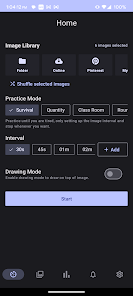
Gesture Drawing Practice uses three types of sessions, i.e. Survival, Quantity and Rounds with different numbers of intervals.
Users can create their own media library for figure drawing or art pose, along with this, you can upload images online or folders from your desktop.
Although, survival mode enables collection of images upto 25 only, but in quantity session, users can upload images according to their number of counts.
Round sessions helps you to boost your efficiency of drawing quickposes and line of action as it allows users to set profile, which includes Number of Rounds, Interval per Round, Rest Interval per Round and Images per Round.
Select Type of Session ⇾ Create Media Library ⇾ Upload Images or Library ⇾ Set Interval of Time ⇾ Practice Figure Drawing
TIPS
Give specific focus to your figure drawing timed sessions
Start drawing recognizable faces
Try to improve line of action, compositions and proportions of hand and feet regarding to the rest of the body
Less use of sketchy lines for your contour drawing
Focus on different planes of the face, such as shading of cheekbones depending upon the subject’s age
Draw 10 lines or less to capture the main elements of art pose or figure drawing
Study Figure Drawing and Special Leg Anatomy
Ranking di utilizzo di Gesture Drawing Practice
Il ranking di utilizzo si basa sull'algoritmo di Similarweb che calcola le installazioni correnti e gli utenti attivi su un periodo di 28 giorni.
Tutte le categorie in
Stati Uniti--
Arte e Design in
Stati Uniti--
Interessi degli utenti e categorie principali
Le categorie principali e le app utilizzate dagli utenti di Gesture Drawing Practice
Categorie principali
Affinità
Le migliori app all'interno della categoria
Altri applicazioni
23%


20%






17%


12%


Principali concorrenti e app alternative
App con un'alta probabilità di essere utilizzate dagli stessi utenti, provenienti dallo stesso store.

ArtFlow: Paint Draw Sketchbook

in3D: Avatar Creator Pro
Prisma Art Effect Photo Editor

MediBang Paint:Draw Art, Comic
Gesture Drawing Practice VS. febbraio 16, 2026