

You’ve hit your search limit
Start your free trial to keep exploring full traffic and performance insights.
Get StartedSkanApp - AR PDF book scanner analisi dell'app per 22 febbraio
SkanApp - AR PDF book scanner
- GO2GET
- Google Play Store
- A pagamento
- Produttività
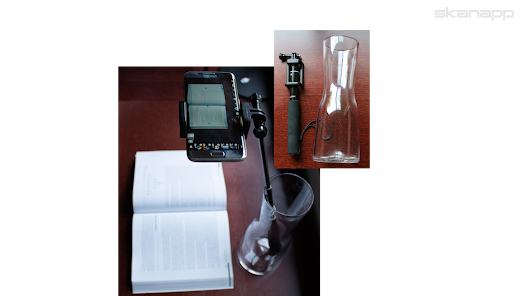
Place your smartphone in the Skanstick, available on Amazon and www.go2get.com, and enjoy the benefits of scanning naturally, in place.
Having both hands free, enhanced by Augmented Reality buttons, lets you hold and scan stapled documents, folded receipts, books and magazines and even add voice remarks without touching the phone.
With the app's incredible speed of 400 pages in 10 minutes¹, you can declutter your office by scanning all those documents in big three-ring binders and piles of folded receipts quickly and easily.
OCR (100+ languages) is done on the phone, Internet is not required.
With a single click of the button the files can be saved up to five destinations regardless of Internet or Wi-Fi connectivity at the time. As soon as Internet or a particular Wi-Fi network is detected (work, home, etc..) the corresponding files will be transferred to appropriate computers/folders or databases (Smart Personal Cloud / CloudOTG).
As saving the file into different destinations is done by a background process, you can continue scanning without waiting until saving is complete. Or, you can even close SkanApp as soon as you press the Send/Save button to conserve the battery.
The built-in interfaces for Windows PCs and Smart Personal Cloud / CloudOTG storages make it easy to find and download any type of file onto the phone. For the file types other than PDF or JPEG, an appropriate app can be launched.
For example, you can download an .STL file for a 3D printer to generate a JPEG view at a particular angle and insert it into any of the images in the Preview or any of the existing files (JPEG or PDF).
The ability to save files automatically into several destinations follows the Backup 3-2-1 rule - a standard operating procedure for data backup, ensuring that your data is safe and sound against any conceivable problem.
Such versatility/approach requires All Files Access and View All Packages permissions.
SkanApp's Email service will automatically split large PDF files or groups of JPEG images into several emails with valid attachment sizes.
When used in a hand-held mode, especially outside on a sunny day when on-screen buttons are difficult to see, the SkanApp offers a convenient option to use physical, tactile buttons of your smartphone. Press the Volume Down button to turn on/off the voice notes recording. And use a single and double press on the Volume Up button to take pictures and blast them into the Cloud as JPEG or multipage PDF files.
The Augmented Reality Capture and Cloud buttons can also be activated remotely by any Bluetooth selfie stick, Bluetooth remote shutters and any headphones or audio cables (i.e. Cellet's Hands-Free Audio Cable, UPC 800768507113) with a Media button.
¹ Once scanning is finished, the app can be suspended/paused (Home button), and the long running tasks, such as OCR, will be completed by its background process.
Watch Getting Started video on https://go2get.wistia.com/medias/ipd4gl9nb5
Ranking di utilizzo di SkanApp - AR PDF book scanner
Il ranking di utilizzo si basa sull'algoritmo di Similarweb che calcola le installazioni correnti e gli utenti attivi su un periodo di 28 giorni.
Tutte le categorie in
Germania#347
Produttività in
Germania#62
Interessi degli utenti e categorie principali
Le categorie principali e le app utilizzate dagli utenti di SkanApp - AR PDF book scanner
Categorie principali
Affinità
Le migliori app all'interno della categoria
Altri applicazioni
22%





20%




18%





11%



Principali concorrenti e app alternative
App con un'alta probabilità di essere utilizzate dagli stessi utenti, provenienti dallo stesso store.

PDF Scanner Plus - Doc Scanner

Genius Scan - PDF Scanner

vFlat Scan - PDF Scanner, OCR

SynkedUP
SkanApp - AR PDF book scanner VS. febbraio 22, 2026