

Lock-Hide File analisi dell'app per 27 febbraio

Lock-Hide File
- smartkts app
- Google Play Store
- Gratis
- Strumenti
Keep file hidden safe from prying eyes in Lock-Hide File! - The ultimate secret gallery lock app to hide any files on your Android devices.
Lock-Hide File locker is the easiest and safest way to create a secure location on your device to store and protect your personal/important photos and videos and ensure that friends who use your phone don’t see your personal photos/videos if they browse through your gallery.
Sensitive videos and Sensitive photos from your Android explorer can be kept safely locked away in a secure accessible only via a secret PIN code
All features are enabled without limitations. Get Hide file and Lock file and folder like photos, videos, documents, audios safely and secretly for FREE.!
Features:
- App lock file and hide file to keep your privacy safe!
- Hidden photos, hidden videos and any other files ( document, audio, etc)
- Hide file - Unhide file secretly and safely!
- This app lock fast when you click HOME button
- File will be hidden and locked in the advanced level
- Through storage device / SD card of the phone to lock and unlock file.
- No any storage limitation to hide photo and hide video
- Filtering, sorting and searching of secret, hidden or restored files
- Fast and reliable file locker
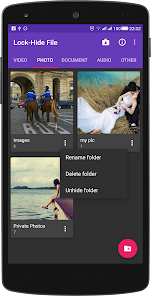
- Manage your pictures and videos(new folder, rename, delete)
- Hide file locker app will not appear in the list of recent applications
- Scan gallery fastest. It will scan your phone's file, allowing you to manage the file explorer more easily.
- With optimized features and user- friendly material interface, lock-hide file is considered one of the best apps on security “hide video”, “hide photo” and document etc…
Instruction of Lock-Hide File:
- Step 1: Enter the Password to access Lock-Hide File.
- Step 2: Create folders to make management easier.
- Step 3: Select the any file that needs to be hidden from the Storage / SD card.
- Step 4: Click the app lock icon and complete the hidden file.
Experience the great features of the app right now and give us your rating in order for us to improve, adding necessary features relating to the operation of applications. As well as many other questions can be send feedback in application. If you like our app, please take a minute to rate it on Google Play.
Ranking di utilizzo di Lock-Hide File
Il ranking di utilizzo si basa sull'algoritmo di Similarweb che calcola le installazioni correnti e gli utenti attivi su un periodo di 28 giorni.
Tutte le categorie in
Stati Uniti--
Strumenti in
Stati Uniti--
Principali concorrenti e app alternative
App con un'alta probabilità di essere utilizzate dagli stessi utenti, provenienti dallo stesso store.

LockMyPix Photo Vault PREMIUM

Authenticator 2FA - OTP

Duplifix: Duplicate Photos

My Folder : Safe Secure Hidden
 Lock-Hide File VS.
 febbraio 27, 2026