

You’ve hit your search limit
Start your free trial to keep exploring full traffic and performance insights.
Get StartedScreenshot touch analisi dell'app per 21 aprile
Screenshot touch
- Daejeong Kim
- Google Play Store
- Gratis
- Strumenti
Tap once on the icon floating on the screen to capture. Edit and share freely. Capture entire pages of websites in the in-app web browser. You can also stitch together multiple images to create a seamless one.
* Certain secure apps (e.g. banking, DRM apps) cannot be captured. *
[ Basic features ]
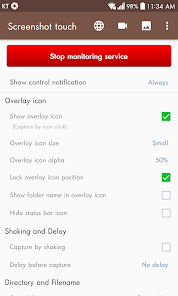
• Capture by touch (Notification area, overlay icon, shaking the device)
• Record video cast of screen to mp4 with options (Resolution, Frame rate, Bit rate, audio)
• Web page whole scroll capture (with an in-app web browser)
• There are two ways to scroll capture. One is to share the url in a web browser and select Screenshot Touch. The second is to call the in-app browser directly by pressing the globe icon on the settings page.
• Photo viewer(memo, hashtag, slide show, share by zip)
• Image cropper(Crop ratio, rotate, Text recognition)
• Image Editor(Pen, Text, Rectangle, Circle, Sticker, Emoji, Opacity and so on)
• Stitching images
• Images to pdf
• Sharing screenshot images to other installed apps (user controlled)
[ Dynamic features ]
• Capture options (choose the save directory, optional subfolders, file format, jpeg quality, capture delay and so on)
• Persistent notification (optional): This allows the notification to always remain present which cannot be swiped away. It quickens the accessibility of Screenshot touch.
• Multiple saving folders: This allows you to create subfolders in a categorising manner for grouping your screenshots. This especially helps when taking a series of screenshots of different screen activities by organizing what gets saved where avoiding having to use a file manager afterwards. For example; you might not want your Facebook screenshots mixed up in the same folder with your screenshots of your favourite app, game or homescreen.
[ Notice ]
• Media Projection Service is an Android OS function for sharing screen activity. The screen capture function uses this service, so a confirmation window is displayed to obtain user consent.
[ Ads and Purchasing ]
• This app contains ads (advertisements)
• In-app purchasing can: “Remove all ads” + “Unlock full Multiple saving folders” + “Using Webp, HEIF image format”.
[ Privacy and Permissions ]
1) Required access permissions
- Files and media(Photos and videos)
Save and manage captured images or recorded videos as files.
- Display over other apps
Display an icon that allows you to capture the screen on top of all screens.
- Recording or casting
Permission is required to capture and record. App can request permission again if it is reset.
2) Optional access permissions(Even if optional permissions are not allowed, you can still use other services.)
- Notifications
Display the status of the screen capture service and displays screen capture results as notifications.
- Microphone
Screenshot touch requires the Microphone permission to record the user's voice whilst recording the screen. This is a useful feature when creating any tutorial using video from a mobile phone. The sound recording function using the microphone is turned off by default.
INTERNET permission is required for error log transfer and ads module. User’s images and videos remain private and are not automatically shared to anywhere or anyone outside of this app.
[ Information about using the Accessibility Services API ]
This app captures using the Media Projection API on Android 5 and higher. However, Android 11 and higher also supports screen capture using the Accessibility Services API to allow users to capture screens more easily. This app is not an accessibility tool. It uses only minimal features, the capture function.
This app does not collect or share any data using accessibility services. No capture without explicit user action.
The app also performs its functions with the user's explicit consent. For detailed instructions, see https://youtu.be/eIsx6IIv1R8.
Ranking di utilizzo di Screenshot touch
Il ranking di utilizzo si basa sull'algoritmo di Similarweb che calcola le installazioni correnti e gli utenti attivi su un periodo di 28 giorni.
Tutte le categorie in
Stati Uniti#3,338
Strumenti in
Stati Uniti#404
Interessi degli utenti e categorie principali
Le categorie principali e le app utilizzate dagli utenti di Screenshot touch
Categorie principali
Affinità
Le migliori app all'interno della categoria
Altri applicazioni
18%






9%





9%





9%





Principali concorrenti e app alternative
App con un'alta probabilità di essere utilizzate dagli stessi utenti, provenienti dallo stesso store.

ScreenMaster:Screenshot Markup

Private Screenshots

Loom – Screen and Cam Recorder

Screen Recorder
Screenshot touch VS. aprile 21, 2026