

You’ve hit your search limit
Start your free trial to keep exploring full traffic and performance insights.
Get StartedMyPay – Nepal’s Digital Wallet analisi dell'app per 8 aprile

MyPay – Nepal’s Digital Wallet
- Smart Card Nepal Pvt Ltd
- Google Play Store
- Gratis
- Finanza
About This App
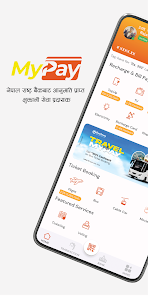
MyPay is more than just Nepal’s digital wallet, it's your complete financial partner. From mobile recharges to utility bill payments, fund transfers, online shopping, DEMAT account renewals even Bluebook renewals, MyPay provides a secure, convenient, and user-friendly platform to manage all your financial activities. Whether at home or anywhere else, we ensure that your online payments are swift, secure, and simple.
Key Features:
- Secure and Reliable online payments: Cutting-edge encryption technology to ensure that all your transactions are protected and safe.
- Easy Mobile Recharges: Top up any mobile network in Nepal instantly. With MyPay, you can recharge NTC, Ncell, and other operators in seconds.
- Effortless Bill Payments: Pay your electricity, water, internet, DTH, ISP, and TV bills from the comfort of your home. No more waiting in lines, just a few taps, and you’re done.
- Quick Fund Transfers: Send money to any bank account or digital wallet in Nepal quickly and securely. With our service, transferring money is as easy as sending a message.
- DEMAT and Mero Share Account Renewal: MyPay is the digital wallet in Nepal that also allows you to renew your DEMAT and Mero Share account directly through the app. Stay on top of your investments with ease.
- Bus and Flight Ticket Booking: Plan your travels effortlessly, Book your bus and flight tickets from anywhere, anytime, and enjoy a hassle-free journey.
- Insurance Payments: Keep your insurance policies up to date by paying your premiums directly. We make it easy to secure your future.
- Government Payments: Handle your government payments, including taxes and fees, and loksewa exam payments conveniently through our integrated payment system.
- Top-Up & Entertainment Services: Recharge your TV subscriptions, and ISP subscriptions, pay for gaming vouchers, and access other entertainment services directly from the app.
- Other Services: Merchant partner and online payment options in; KTM CTY, Mero Doctor, Bus Sewa, Smart Service Inn, and 35+ businesses all over Nepal
Event ticketing and voting: We provide you the ticketing and voting support for the successful completion of any kind of event.
Remittance: Options for receiving remittance directly on our app from remittance companies such as; MyPay Money transfer, Samsara Remit, and NIC Asia Remit for your ease and convenience.
Entertainment: Pre-booking of adventure games and sports such as Paragliding, Bungee Jumping, Zip flyer, Swing/ Sky Screamer, and ATV rides.
Exam Preparation: Both the Physical and online entrance exam preparation classes are available. We provide free online classes for the driving license exam, +2 Management, +2 Science, St. Xavier’s +2 Science preparation, BSc, Nursing, IOE exam, and KU engineering exam preparation
How to load funds?
Loading funds into your MyPay wallet is quick and straightforward. Here's how you can do it:
1. Mobile banking:
• Open the MyPay App.
• Click on the Load Wallet icon on the Dashboard.
• Now, tap on Mobile Banking.
• Select your bank.
• Enter the amount to be loaded and the purpose, then click the Send button.
• Enter your wallet's mobile number and password, and click on login.
• Now, review all the details and click on Confirm.
• Enter the OTP received on your mobile and complete the Fund Load process.
2. Connect IPS:
• Open the MyPay App.
• Click on the Load Wallet icon on the Dashboard.
• Now, tap on Connect IPS.
• Enter the amount and purpose and tap on send
• Enter all the details and tap on sign-in.
• Choose the bank of your choice and tap on send
3. Debit/Credit Cards:
Step 1: Log in to your MyPay app on your smartphone.
Step 2: Go to the "Load Funds" or "Top-up" section in the app.
Step 3: Select "Debit/Credit Card" as your preferred payment method.
Step 4: Enter your card details and the amount you want to load.
Step 5: Verify the details and confirm the payment.
Ranking di utilizzo di MyPay – Nepal’s Digital Wallet
Il ranking di utilizzo si basa sull'algoritmo di Similarweb che calcola le installazioni correnti e gli utenti attivi su un periodo di 28 giorni.
Tutte le categorie in
Stati Uniti--
Finanza in
Stati Uniti--
Principali concorrenti e app alternative
App con un'alta probabilità di essere utilizzate dagli stessi utenti, provenienti dallo stesso store.

eSewa - Mobile Wallet (Nepal)

Ncell App: Recharge, Buy Packs

CashBook: UPI Wallet for Staff

Nomod | Payment Links
 MyPay – Nepal’s Digital Wallet VS.
 aprile 8, 2026