

You’ve hit your search limit
Start your free trial to keep exploring full traffic and performance insights.
Get StartedScreen recording analisi dell'app per 15 aprile

Screen recording
- ColorOS
- Google Play Store
- Gratis
- Strumenti
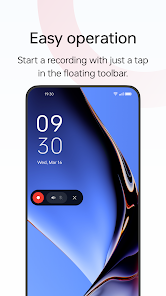
Screen recording is a tool provided by OPPO that lets you conveniently record your screen.
Multiple ways to open this tool
- Bring up the Smart Sidebar from the screen edge and tap "Screen recording".
- Swipe down from the top of the screen to bring up Quick Settings and tap "Screen recording".
- Swipe down in an empty area on the Home screen, search for "Screen recording" and tap the icon of this tool.
- Open a game in Game Space, swipe from the upper-left corner of the screen to the lower-right corner, and choose "Screen recording" from the menu.
Various video quality options
- Choose the definition, frame rate, and coding format you want to record with.
Useful settings
- You can record the system sound, external sound through the microphone, or both at once.
- You can record video with the front camera while simultaneously recording your screen.
- Screen touches can also be recorded.
- You can pause or resume a recording by tapping the button on the recorder toolbar.
Share your recordings
- When a recording is complete, a floating window will appear. You can tap "Share" under the window to share it or tap the window itself to edit the video before sharing.
Ranking di utilizzo di Screen recording
Il ranking di utilizzo si basa sull'algoritmo di Similarweb che calcola le installazioni correnti e gli utenti attivi su un periodo di 28 giorni.
Tutte le categorie in
Stati Uniti#8,701
Strumenti in
Stati Uniti#1,096
Interessi degli utenti e categorie principali
Le categorie principali e le app utilizzate dagli utenti di Screen recording
Categorie principali
Affinità
Le migliori app all'interno della categoria
Altri applicazioni
22%






10%





9%





5%




Principali concorrenti e app alternative
App con un'alta probabilità di essere utilizzate dagli stessi utenti, provenienti dallo stesso store.

AGC ToolKit - Watermark LUT

OnePlus Community

Arenti

Quick Share: Phone Clone
Screen recording VS. aprile 15, 2026