

You’ve hit your search limit
Start your free trial to keep exploring full traffic and performance insights.
Get StartedSD Card Test Pro - Fake Check analisi dell'app per 27 aprile
SD Card Test Pro - Fake Check
- Zoltán Pallagi
- Google Play Store
- A pagamento
- Strumenti
Bought a cheap SD card? It might be fake.
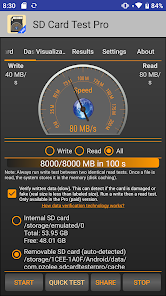
Fake SD cards report more storage than they actually have — and they silently corrupt your photos, videos and files. SD Card Test Pro detects fake cards, measures real read/write speed, and tells you exactly what type of storage you have. No ads. No limits.
✔ Fake card detection — verify your card is genuine
✔ Read & write speed test — see the real performance
✔ Damaged card detection — catch problems before data loss
✔ Internal storage test — benchmark your phone's built-in memory
✔ Storage type detection — eMMC, UFS 2.0, UFS 2.1, UFS 3.x
✔ SD card class detection — Class 10, UHS-I, UHS-II, UHS-III
✔ Supports Micro SD, SDHC, SDXC
✔ File system support — FAT32, exFAT, ext4
✔ Customized benchmarks for advanced users
✔ One-tap result sharing
Works great for:
→ Checking cards bought online (Amazon, AliExpress, Temu)
→ Testing SD cards for cameras, dashcams, drones
→ Verifying storage before storing important data
→ Diagnosing slow phones or apps
Easy to use — results in minutes, even for beginners.
Pro version advantages:
★ No ads
★ Faster updates and bug fixes
★ Customized benchmark settings
Supported cards: Micro SD, SDHC, SDXC, built-in eMMC/UFS storage
Technical note: For accurate class detection the app needs at least 4 GB written and 10 seconds of test time. For FAT32 cards, use multiple smaller files instead of one large file.
Classifica degli store
La classifica del store si basa su diversi parametri stabiliti da Google e Apple.
Tutte le categorie in
Stati Uniti--
Strumenti in
Stati Uniti#169
Interessi degli utenti e categorie principali
Le categorie principali e le app utilizzate dagli utenti di SD Card Test Pro - Fake Check
Categorie principali
Affinità
Le migliori app all'interno della categoria
22%



17%


16%

15%

Principali concorrenti e app alternative
App con un'alta probabilità di essere utilizzate dagli stessi utenti, provenienti dallo stesso store.

AppDash: App Manager & Backup

TopScan

ASTRO File Manager & Cleaner

Trend Micro ID Protection
 SD Card Test Pro - Fake Check VS.
 aprile 27, 2026