

You’ve hit your search limit
Start your free trial to keep exploring full traffic and performance insights.
Get StartedUSB Camera Pro analisi dell'app per 18 aprile
USB Camera Pro
- 沈垚 / ShenYao China
- Google Play Store
- A pagamento
- Lettori video ed editor
Using USB 3.0 HDMI capture card : https://youtu.be/WkmuyfwKVrs
Using UVC H.264 device : https://youtu.be/j-71QMNuDr0
Connect multiple devices : https://youtu.be/2znw4eVazDs
RTSP real time stream : https://youtu.be/-Qzc0RSDerg
RTMP live streaming : https://youtu.be/S5Bc1r57CUU
Picture In Picture : https://youtu.be/Mbturdxyi5c
VR/FPV View : https://youtu.be/zEqBXLNFnE0
Display Video On Lock Screen : https://youtu.be/Hdf2H_YusO
Tip:
Supports following devices:
* UVC WebCam with microphone or external USB Audio input (Supports H.264, H.265, HEVC, MJPG, YUY2, P010, NV12 and so on)
* UVC video grabber with audio input or external USB Audio input (Up to 4K via HDMI, Supports H.264, H.265, HEVC, MJPG, YUY2, P010, NV12 and so on, Supports progressive and interlaced video)
* Windows Hello Camera and IR Camera
* Geek szitman supercamera(2ce3:3828)non-UVC devices, e.g. USB Endoscope
* EasyCap including audio with UTV007 / HTV600 / HTV800 chipsets (VID_1B71&PID_3002)
* EasyCap including audio with STK1160 + SAA7113/GM7113 + AC97 chipsets (Audio 48kHz stereo version VID_05E1&PID_0408)
* EasyCap including audio with STK1160 + SAA7113/GM7113 (Audio 8kHz mono version VID_05E1&PID_0408)
* EasyCap including audio with EM2860 + SAA7113/GM7113 + AC97 chipsets (VID_EB1A&PID_2861)
* EasyCap including audio with SMI2021 + SAA7113/GM7113 + ES7240/CS5340 chipsets (VID_1C88&PID_0007, PID_003C, PID_003D, PID_003E, PID_003F, PID_1001)
Please use a good quality OTG cable and ensure power supply. Some devices may need to bridge HUB to enhanced USB signals to work properly, e.g. Elgato Cam link, ezcap Video Grabber.
Using HEVC for video recording/streaming requires Android 5.0 or above, and the device must supports HEVC codec.
Using AV1 for video streaming requires Android 10 or above, and the device must supports AV1 codec.
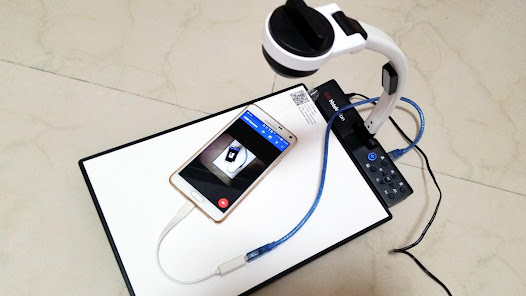
"USB Camera" can let your android device connect to USB WebCam or video capture card via USB-OTG. You can record video or capture snapshot, OR turn your phone into a wireless IP Camera via build-in RTSP and HTTP Server for security monitoring WITH Bi-directional audio support, you can use your browser to view, of course, include "IP Camera" App.
"USB Camera" can mix USB Audio with a built-in microphone or system audio and output, or overlay the built-in camera/screen video onto the external camera video.
"USB Camera" can push the video and audio to RTMP/SRT live media server and use for network live broadcast. It supports the rtmps security protocol and SRT protocol and it can also push the media to multiple media server at the same time. It also supports HEVC/AV1 over RTMP and can be used for YouTube Live currently.
"USB Camera" supports Side by Side(SBS) view and it can work with FPV goggle
"USB Camera" can add timestamp, GPS, speed and other info on the video frames while recording and can use your headset or Bluetooth headset to capture snapshot and record video. It also supports WebCam's snapshot button.
"USB Camera" supports loop-recording. Can set auto-segment when recording and auto-delete old video archives when no enough storage. "USB Camera" can be used as "Dash Cam"
USB Camera can seamless switching between foreground and background. Just press 'Enter background' from menu. The recording will not interrupted during switching!
It support auto video recording which based on Motion Detection and the video record can be uploaded to FTP server automatically and notify you via Email!
Bi-directional audio requires IP Camera App, you can get it from https://play.google.com/store/apps/details?id=com.shenyaocn.android.WebCamPro
IMPORTANT! On Android 9 and above, Camera permission is required to get fully USB Video device access.
This is userspace driver so it used for the app only. Android does not allow to install kernel driver so it unable to use for third-party apps.
Ranking di utilizzo di USB Camera Pro
Il ranking di utilizzo si basa sull'algoritmo di Similarweb che calcola le installazioni correnti e gli utenti attivi su un periodo di 28 giorni.
Tutte le categorie in
Stati Uniti#549
Lettori video ed editor in
Stati Uniti#19
Interessi degli utenti e categorie principali
Le categorie principali e le app utilizzate dagli utenti di USB Camera Pro
Categorie principali
Affinità
Le migliori app all'interno della categoria
23%





11%




10%


9%


Principali concorrenti e app alternative
App con un'alta probabilità di essere utilizzate dagli stessi utenti, provenienti dallo stesso store.

Video Converter Pro

mcpro24fps manual video camera

Loom – Screen and Cam Recorder

IPC360 Home
 USB Camera Pro VS.
 aprile 18, 2026