

You’ve hit your search limit
Start your free trial to keep exploring full traffic and performance insights.
Get StartedAlways On AMOLED analisi dell'app per 22 febbraio

Always On AMOLED
- Firehawk
- Google Play Store
- Gratis
- Personalizzazione
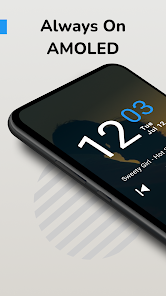
Always On Display (AOD) and Always on Amoled app can transform your ordinary lock screen into an interactive, informative, and stylish lock screen.
📱 Always On Display, Always On AMOLED! 📱
The original and best are always on display for everyone. Get an always on display for your phone or tablet. Keep your screen lock on all the time.
Your clock lock app screen is not just about functionality; it's about making your device truly yours. Change your Lock Screen Clock Style, pick from mesmerizing AMOLED Display Wallpapers, and much more! 💯👌
👉👉👉 Ready to revolutionize your device's display? Download our app now and enter the smart, stylish, and convenient Always On Display Clocks world.
🌟 An Always On Display for every device! 🌟
This is made possible thanks to the AMOLED display app. Most of the screen stays black except for a few pixels.
★★★ Notable FEATURES ★★★
📱 Always On screen lock, always on display app, screen saver;
🎨 Customization - Tons of customization options, fonts, clock styles, and much more;
🔒 Pocket mode - lock the device when you leave it in your pocket to save battery;
📩 Notifications - view notifications without touching your device;
⏰ New: Now featuring Raise to Wake;
🖼️ New: Backgrounds and AMOLED Display Wallpapers;
💡 New: Edge glow for new notifications;
📒 New: Quick note-taking! Quickly scribble or write from the always on display clock;
🎵 Music - control your music quickly and easily;
🌙 Auto night mode - dim the screen automatically in a dark environment;
🔋 Greenify integration - start Greenify automatically when locking the screen to save battery.
Customize your device with an array of AMOLED Display Wallpapers and Lock Screen Clock Style Changes. Tailor your screen lock to reflect your unique style, making every interaction with your device a delight.
🚀 Transform with Always On AMOLED! 🚀
✅ Automatic rules - preserve battery using predefined rules;
✅ Auto movement - avoid AMOLED burn-in;
✅ View the weather at a glimpse;
✅ Custom watch faces - Digital S7 style, Classic 24H, Analog S7 style, Analog Pebble style and more;
✅ Always On Memo - write a reminder and make it show up on your screen all the time;
✅ Double tap to wake + Swipe up to wake + Volume keys to wake + Back button to wake;
✅ Force orientation - set your preferred screen orientation, screen saver;
✅ Can be used as a night clock;
✅ Tasker integration - Start/Stop the always on display clock (AOD), granting you infinite possibilities;
✅ Force doze - AMOLED display app.
⬇️ Download now and transform your device's AMOLED Display app into a hub of elegance, utility, and innovation. Say goodbye to the ordinary and embrace a lock screen that's always on. Your device deserves the best Always On Display App – get it today! 🌟
Users can have information about time, date, notifications, and more without touching the phone. Just by looking at it.
🕒 Display Clock on Screen! 🕒
Whether it's day or night, our Always On Display Amoled Clock adapts to your environment. With the Always On AMOLED feature, you'll have a clear display.
Customizing your Display Clock on Screen is just a swipe away. Our user-friendly interface allows for quick and easy Lock Screen Clock Style Changes.
🌌🌌🌌 Amoled Display, AOD Perfection! 🌌🌌🌌
Permissions.
Camera permission.
The app needs camera permission to toggle the flashlight
Phone permission.
The app needs phone permission to recognize incoming calls, dismiss the always on screen, and show the incoming call screen.
Modify system settings permission.
The app needs permission to modify system settings to change the brightness of the lock screen.
** Note: For Xiaomi devices, you will need to access the Security App -> Permissions -> Permissions -> Always On AMOLED -> Display pop-up window permission and Show on Lock screen.
Ranking di utilizzo di Always On AMOLED
Il ranking di utilizzo si basa sull'algoritmo di Similarweb che calcola le installazioni correnti e gli utenti attivi su un periodo di 28 giorni.
Tutte le categorie in
Germania--
Personalizzazione in
Germania#147
Interessi degli utenti e categorie principali
Le categorie principali e le app utilizzate dagli utenti di Always On AMOLED
Categorie principali
Affinità
Le migliori app all'interno della categoria
Altri applicazioni
29%




26%



8%


7%


Principali concorrenti e app alternative
App con un'alta probabilità di essere utilizzate dagli stessi utenti, provenienti dallo stesso store.
Muviz Edge: AOD & Edge Lights

DNA Launcher

Alpha Hybrid Launcher 4D theme

Niagara Launcher ‧ Home Screen
Always On AMOLED VS. febbraio 22, 2026