

You’ve hit your search limit
Start your free trial to keep exploring full traffic and performance insights.
Get StartedSkyHalo Weather for Wear OS app analytics for February 24

SkyHalo Weather for Wear OS
- Videotropic
- Google Play Store
- Paid
- Weather
(Note: For watches running Wear 5.0 and above, download SkyHalo 2)
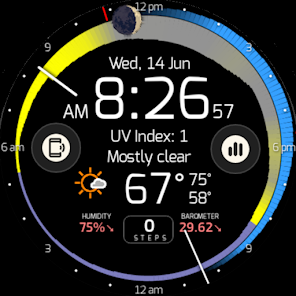
SkyHalo is the ultimate weather forecast watch face for all Wear OS watches (Pixel, Galaxy, OnePlus, etc.). Features include:
— Choice of six forecast sources (incl. Apple Weather, OpenWeather and others) -- and counting!
— Continuous forecasts up to 48 hours
— Daily & hourly forecasts for up to 5 days
— NWS* weather alerts
— Rain/snow forecasts
— Barometer and wind displays
— Sun/moon rise/set
— Moon phase and location
— Up to three complications
It's the most weather information available in any watch face, in a beautiful and intuitive format.
Built off of an original idea by Simon Barke (the no-longer-working Krona Sunlight), we've made significant additions and improvements unavailable anywhere else.
SkyHalo is tested on Wear 2.x, 3.x and 4.x, and is protected from obsolescence (such as the shuttering of DarkSky) by allowing you to choose from six alternate sources, including Apple Weather.
HOW IT WORKS:
The halos are read clockwise from the hour hand (the current time), and graphically present the following information:
— Temperature: The width of the ring at any point represents the temperature forecast for that time: the thicker the ring, the warmer it will be.
— Cloudiness: The color of that part of the ring represents the sky conditions, with yellow for sunny, gray for completely cloudy, or any shade in between for partial sun. Sunset and sunrise times are indicated by a violet tint.
— Rain and snow: An outer halo will appear if precipitation is in the forecast: blue for rain, white for snow/sleet. The thickness of the outer ring indicates the intensity of the precipitation.
With no more than these three indicators you can glance at the ring and immediately see that it's cool and raining right now, but the sun should start coming out about 2:00pm with the temperatures topping out around 4:30pm, and sunset occurring at 6:15pm. You can graphically watch the increase/decrease of daylight hours as the year progresses.
---------------------
Outside the weather rings is the moon, showing the current phase and location: upper half of the watch face means above the horizon (east on the left, west on the right). Tapping the moon pops up the exact times of sun/moon rise and set.
---------------------
Current weather conditions, humidity and barometer are displayed in the lower half of the face. Tapping this area will cycle through three screens:
— Temperature (current / high / low);
— Wind speed (current / high / low); thickness of the ring represents wind speed; the wind direction is indicated by the ring's color (defined by the color key icon in the lower portion of the screen). Gust speed is indicated by the outer ring.
— Precipitation (rain, snow, sleet)
If severe weather advisories have been issued by the NWS*, a color-coded alert triangle will be displayed to the left of the current conditions (this is a feature that has never before been available on a weather watchface). Tapping it will bring up the detailed alert(s), including the severity, time, location, and any additional information.
---------------------
What's tomorrow's weather? If you tap to the right of the current conditions, the weather rings jump ahead to the next twelve hours, then twenty-four, then thirty-six.
Tapping the 6:00 position displays a table of daily/hourly forecasts, and tapping the 12:00 position displays the NWS* or AI-based three-day weather forecast in descriptive format.
* National Weather Service, within the U.S.
---------------------
Configurable options include:
— Weather service source
— Real / Apparent temperatures
— 12h / 24h format
— Imperial / Metric units
— Date format (MM/DD or DD/MM)
— Configurable standby screen elements
— Text / background colors or images
— Availability of three complications, such as Step Count (from Fitbit/Google Fit)
SkyHalo Weather for Wear OS Usage Rank
The usage rank is based on Similarweb's algorithm that calculates current installs and active users over a 28-day period.
All Categories in
United States--
Weather in
United States--
Top Competitors & Alternative Apps
Apps with a high probability of being used by the same users, from the same store.
WeatherSpork
White Risk - SLF Avalanche App

WeatherX Forecast
 SkyHalo Weather for Wear OS VS.
 February 24, 2026