

You’ve hit your search limit
Start your free trial to keep exploring full traffic and performance insights.
Get StartedBrightness Control & Dimmer analisi dell'app per 22 febbraio

Brightness Control & Dimmer
- Mikhail Bykhovskiy
- Google Play Store
- Gratis
- Strumenti
Free Android 12 ready user-friendly brightness control widget with custom brightness user levels. Dimmer / screen filter that can make your screen darker than the system’s minimum brightness level (e.g. -75%, -60%, etc.). Brightness control buttons in the notification that work even on your lock screen. Saves battery, protects your eyes. Try it out for FREE!
Features
● This app allows you to control brightness a lot faster and easier than the default Android system brightness settings allow.
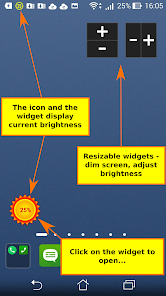
● A convenient widget with customizable brightness controls: you can assign your custom brightness levels to the quick buttons and then adjust brightness in one click.
● You can configure the appearance of the brightness controls: you can show or hide UI elements as you like. Hide unnecessary brightness buttons if you need only a slider, or hide the slider and use only buttons, or use both of them.
● Dimmer / screen filter / night mode: you can reduce brightness to a lower value than the default settings allow (sub zero brightness levels, e.g. -50%, -60% etc.). The semi-transparent layer is drawn over your screen to reduce brightness below zero. It will protect your eyes in a dark environment.
● This app saves your battery if you have an AMOLED display. The amount of power the display consumes varies significantly depending on the colour and brightness shown. For details please see: http://en.wikipedia.org/wiki/AMOLED#Comparison_to_other_technologies
● Brightness controls in the notification will allow you to quickly control brightness from anywhere (even from games), just open the notification drawer. You can set your custom brightness levels for the quick buttons in the notification too.
● Your can control brightness even on the lock screen (supported in android 4.2 and above). For Android 5 devices the notification brightness controls should be available on your lock screen by default. You can find instructions inside the app that explain how to enable it on pre Android 5 devices.
● Action bar icon and home screen widget display your current brightness level.
● Far more convenient brightness controls than Android default brightness settings.
● This app will NOT block manual installation of apps (apk files). You can install any apk files that your want and this app will not cause your any problems. There are lots of dimmer (screen filter) apps in the app store that won’t allow you to install apk files because they have conflicts with the security system of Android. They all must be manually disabled to allow you to install apps from apk files and manually reenabled after the installation. This is not convenient! This app automatically disables itself when it detects that you are going to install an apk file and enables itself back after the installation is complete.
● Lots of brightness control apps and widgets in the app store simply don’t adjust brightness because they are incompatible with some devices. This app uses multiple techniques to adjust brightness simultaneously and will work on the majority of the devices.
● Try it out for free!
RISK FREE premium upgrade: if you are unhappy with the premium upgrade you can request a refund within 7 days after the purchase via eMail - no questions asked. Give it a try!
Note: It is not recommended to use multiple brightness control apps at the same time, because in this case brightness widget and brightness icon can show incorrect information.
Feel free to send me an eMail at humblegames.net@gmail.com if you have any questions, problems or suggestions.
Ranking di utilizzo di Brightness Control & Dimmer
Il ranking di utilizzo si basa sull'algoritmo di Similarweb che calcola le installazioni correnti e gli utenti attivi su un periodo di 28 giorni.
Tutte le categorie in
Stati Uniti--
Strumenti in
Stati Uniti--
Interessi degli utenti e categorie principali
Le categorie principali e le app utilizzate dagli utenti di Brightness Control & Dimmer
Categorie principali
Affinità
Le migliori app all'interno della categoria
Altri applicazioni
21%




17%



11%





10%

Principali concorrenti e app alternative
App con un'alta probabilità di essere utilizzate dagli stessi utenti, provenienti dallo stesso store.

Asthma Diary

Duplifix: Duplicate Photos

Muslim: Athan Prayer Qibla
Castro Premium - system info
Brightness Control & Dimmer VS. febbraio 22, 2026