

You’ve hit your search limit
Start your free trial to keep exploring full traffic and performance insights.
Get StartedWi-Fi Monitor analisi dell'app per 24 febbraio

Wi-Fi Monitor
- Andrey Efremov
- Google Play Store
- Gratis
- Strumenti
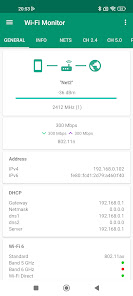
Information about Wi-Fi connection, available networks, connected devices.
For version 1.6.5
GENERAL
- the information about Wi-Fi connection
For getting public IP address, press on internet/earth icon
NETS
- the list of available Wi-Fi networks
- Support filtering of results
- You can open details for net
for android 11+ for most routers available extra info like model, vendor
(channels, country, streams, extensions in PRO)
CH 2.4/5.0
- the charts for available networks by channels groupped for 2.4 or 5.0 GHz
- you can switch to mode with channel width (used center freq for channel)
- you can pause updating
- support scaling by fingers or maximize by double tap
POWER
- chart with power for net at time interval
DEVICES
- the devices connected to your Wi-Fi network
- the quick scan in subnet a.b.c.x
- the deep scan in subnet a.b.x.x (android 13 and lower)
- Try detect hostname, router model
- Support filtering of results
- You can open details
* On Android 13+ with target sdk33 standard method for detect devices not available.
App trying find used IP addresses, you can increase timeout by press "..." button
DEVICES P2P
- Uses Wi-Fi direct for scan nearby wi-fi devices with announcement like TV, printers
- In menu options get vendor by mac
HELP
With new android releases added restrictions for work with Wi-Fi, if something doesn't work, read this help.
If on your device doesn't show net list and android 6.0+, check that location permission is granted.
If permission already granted, check that location turn on. Some devices with 7.0+ required it too.
If on your device doesn't show net name (unknown ssid), then for your device need permission and for last android releases location turn on.
If not found devices in your network, press scan (or deep scan for public network).
If you on android 13, you can increase timeout by press "..." button
* for android 11+ your device's MAC address blocked with target sdk30
PRO VERSION
Theme
- Supports all a light, dark and black theme, choose what you like.
In the free version, black available 2 weeks for the test.
Report in menu info center.
General info, nets, devices. You can choose what include in report.
You can save info to html or PDF file format and open or share by email.
In free version available test for 7 days.
Also supports multiple reports, you can choose previous and open it or share.
Copy text by long press in menu lists.
Extra info about net for android 11+
Tab services in network
- Also this supports development to improve app.
Requirements :
- Android 4.0.3 and above
Permissions :
- INTERNET is required for getting info about connection.
- ACCESS_WIFI_STATE is required for info about wi-fi connection.
- CHANGE_WIFI_STATE is required for active nets scan.
- ACCESS_COARSE_LOCATION is required for getting the list of available networks. For 6.0 and above.
- ACCESS_FINE_LOCATION is required for getting the list of available networks. For 10 and above.
- NEARBY_WIFI_DEVICES is required for getting the list of p2p devices. For 13 and above.
- READ/WRITE EXTERNAL_STORAGE is required for report, open in browser.
Ranking di utilizzo di Wi-Fi Monitor
Il ranking di utilizzo si basa sull'algoritmo di Similarweb che calcola le installazioni correnti e gli utenti attivi su un periodo di 28 giorni.
Tutte le categorie in
Germania--
Strumenti in
Germania--
Interessi degli utenti e categorie principali
Le categorie principali e le app utilizzate dagli utenti di Wi-Fi Monitor
Categorie principali
Affinità
Le migliori app all'interno della categoria
Altri applicazioni
32%






17%



11%





6%
![Silent Camera [High Quality]](https://play-lh.googleusercontent.com/UhkdN9CF-3f6l98ZJoRsGeqelFULr38O09JdCA1Sg7BKvrdioql3-NQPmYDAGscOefJt=s180)



Principali concorrenti e app alternative
App con un'alta probabilità di essere utilizzate dagli stessi utenti, provenienti dallo stesso store.
WiFi Analyzer (open-source)

Nedis SmartLife

Wi-Fi Toolkit

WiFiman
Wi-Fi Monitor VS. febbraio 24, 2026