

CAD Drawing (CAD Program) のアプリ分析 3月29日

CAD Drawing (CAD Program)
- Sebastian Kemper
- Google Play ストア
- 無料
- ライブラリ & デモ
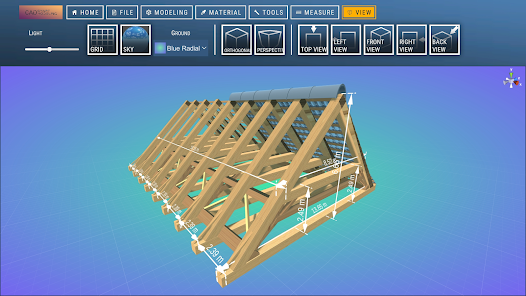
With CAD Drawing, the CAD program (CAD Smart Modeling), you can create 3D models, CAD drawings, and designs directly on your smartphone or tablet – without a 3D scanner or complicated software.
Many CAD and 3D programs are expensive, difficult to use, or only suitable for desktop use.
This CAD app offers you a simple, fast, and mobile workflow, ideal for CAD drawing, 3D modeling, design, and technical design on the go.
Whether you:
• Draw 3D models
• Create CAD sketches
• Model 3D objects
• Plan designs
• Create CAD designs for architecture, product design, or mechanical engineering
With this CAD drawing app, you always have a powerful 3D CAD program at your fingertips.
________________________________________
Why draw with CAD software – CAD Smart Modeling?
Even if you work with programs like Blender, AutoCAD, or other CAD software, this app is perfect for:
• Quick 3D sketches on the go
• Preliminary designs for CAD models
• Mobile 3D drawing
• Visualization of 3D shapes and designs
By drawing in 3D instead of 2D, you are not limited to a single perspective and can identify problems early on.
________________________________________
Features & Tools of the CAD App
1. Fast CAD Workflow
• Intuitive gesture control for fast CAD drawing
• Select multiple nodes, edges, faces, and 3D objects simultaneously
• Efficient work for 3D modeling and CAD design
2. Powerful Editing Tools
• Edit nodes, edges, faces, and objects
• Tools such as extrusion, freehand drawing, and scaling
• Comprehensive tools for precise 3D modeling
3. Display & Analysis Functions
• Adjustable grid with snapping function
• Display of triangles, edge lengths, and distances
• Switchable wireframe view, shadows, and axes
4. Materials
• Over 20 materials for realistic 3D renderings
5. Precise CAD Tools
• Orthographic camera
• Precise movement, rotation, and scaling
________________________________________
6. Import & Export of CAD and 3D Files
• OBJ Import & Export
• Further processing in programs such as:
o Blender
o SketchUp
o Maya
o Cinema 4D
o AutoCAD
o Fusion 360
o SolidWorks
• Support for many formats via conversion:
o STL, OBJ
Ideal for:
• CAD Design
• 3D Printing
• Architecture
• Product Design
• Technical Drawing
Have fun trying it out!
CAD Drawing (CAD Program)使用ランク
使用ランクは、28日間の現在のインストール数とアクティブユーザー数を計算するSimilarwebのアルゴリズムに基づいています。
業界別 ウェブサイトカテゴリーで
米国--
ライブラリ & デモで
米国#40


 CAD Drawing (CAD Program) VS.
 3月 29, 2026