

Pixel Watch 2 Face II のアプリ分析 3月12日

Pixel Watch 2 Face II
- SOC Creations
- Google Play ストア
- 有料
- パーソナライズ
Installation:
1. Make sure you watch is connected to your phone via Bluetooth.
2. Install, download and open the companion app.
3. Go to the watch Play Store, and type the exact watch name(with correct spelling and spacing) and open listing. If price still appears, wait for 2-5 minutes or restart your watch face.
4. Please also try installing the watch face via Galaxy Wearable app(install it if not installed)> Watch Faces> Downloaded and apply it to watch.
5. You can also install this watch face by accessing the Google Play Store in the web browser in a PC or Laptop. Make sure you use the same account you made the purchase from to avoid double charge.
6. If PC/laptop not available, you can use the phone web browser. Head over to the Play Store app, then to the watch face. Click the 3 dots in the upper right hand corner then Share. Use the available browser, login to the account you made the purchase from and install it there.
About the watch face:
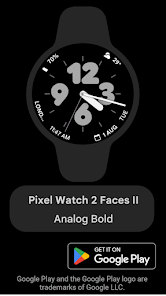
An Analog watch face for your Wear OS smartwatch inspired from Android 14 and Pixel. With organic shapes and pastel colors, this watch face aims to spice up your watch and bring a consistent UI with your phone.
Pixel Watch 2 Face II - Analog Bold
- 4 customizable complications
- Optional Seconds Hand
- 2 Digit Styles
- 12 Color Options
More to come in future updates..
Pixel Watch 2 Face II使用ランク
使用ランクは、28日間の現在のインストール数とアクティブユーザー数を計算するSimilarwebのアルゴリズムに基づいています。
業界別 ウェブサイトカテゴリーで
米国--
パーソナライズで
米国--


 Pixel Watch 2 Face II VS.
 3月 12, 2026