

DIGITAL CLOCK SHG2 のアプリ分析 4月2日

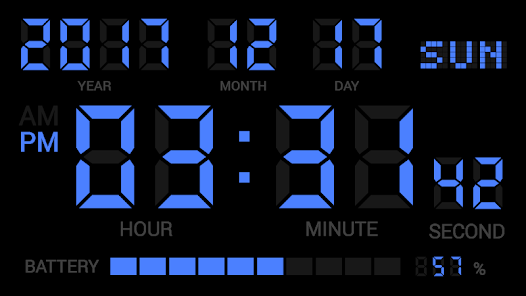
DIGITAL CLOCK SHG2
- Y2PROM
- Google Play ストア
- 有料
- ツール
"【Note】
If you input your questions, bug reports or complaints in review form, it isn't notified developer. Please email directly (y2prom@gmail.com).
■Please inform us about the bug report by e-mail.
【How to use】
● Alarm setting
1. Select the alarm task from the alarm list and open the alarm setting.
2. Set the time to sound the alarm with the [Alarm time].
3. At [Alarm sounds], select the music file to sound at the alarm time.
4. [Vibration], you can select vibration action at alarm.
5. In the [Snooze time], you can set the time when the alarm sounds again.
6. At [Alarm volume], set the volume at alarm time.
7. At [Alarm day], Alarm operation date can be set for each day of the week.
8. To enable the alarm, please turn on the button on the left side of the alarm list.
9. The low power consumption function of Android may invalidate the alarm. After setting the alarm, please confirm whether automatic start of this application is not invalid.
● Setting the notification sound
〇 Setting of time signal sound
From the option button, select the Notification sound -> Time signal.
1. From [Sound type], select OFF, Sound, or Speaking.
2. If you select the sound, it will play a sound at 0 minutes per hour.
3. If you select the speaking, it will say the current time at 0 minutes per hour.
4. In the official version, you can change the type of sound from [Sound Select].
5. In the official version, you can restrict playing sound time at [Enable sound or speak per hour].
〇 Setting of charging completed sound
From the option button, select notification sound -> charge completed.
1. From [Sound type], select off, sound, or speech.
2. If you select the Sound, it will be played a sound when charging is completed.
3. If you select the Speaking, it will be played ""Charging was completed"" when charging is completed.
4. In the official version, you can change the sound from the sound selection.
○ Setting of TTS
To use the reading function, please set TTS. This application supports the Google text-to-speech engine. If other TTS engine is set, reading may not be performed normally.
1. From [TTS setting], you can open the TTS setting in Android system settings. Please make sure that the Google text-to-speech engine is set up.
2. From [TTS Download], open the download page of the Google text-to-speech engine. Please download or update the Google text-to-speech engine.
3. By the [Test], you can try the speaking of TTS. Please check the TTS setting if there is abnormality in reading aloud.
● Clock customization
1. In [Screensaver], you can activate the screen saver to prevent screen burning.
2. [Orientation] is setting for clock orientation.
3. [Startup at charging] is for launch by starting USB charge.
4. [Close at end charging] is for close clock screen by end charging.
6. In [Frame corner], you can select the rectangle or round corner frame. If the background of the clock is black, the rounded corners will not be visible.
7. [Display contents] allows you to set the time and date to be displayed on the screen.
8. In [Date Format], you can change the position of year, month, and day.
9. In [Time format], the time range can be set from 1 to 12 or 0 to 23.
10. In [Colon blinking], toggles the presence or absence of a colon blink.
11. In [seconds display], toggles display of seconds.
12. In [Label display], switch the presence / absence of label display.
13. [Setting status display] toggles the presence / absence of display showing the setting status of alarm setting and notification sound.
14. In [Battery level indicator], select whether or not to display the remaining battery level (gauge).
15. [Charging indicator] is expresses battery charging by battery level gauge.
16. [Screen brightness] adjust the brightness of the clock display.
17. [Color scheme] set the color scheme of the digital clock. In the paid version, you can set your favorite color by selecting Edit 1 to 5."
DIGITAL CLOCK SHG2使用ランク
使用ランクは、28日間の現在のインストール数とアクティブユーザー数を計算するSimilarwebのアルゴリズムに基づいています。
業界別 ウェブサイトカテゴリーで
米国#182
ツールで
米国#27
ユーザーの興味・関心とトップカテゴリー
DIGITAL CLOCK SHG2ユーザーが使用するトップカテゴリーとアプリ










 DIGITAL CLOCK SHG2 VS.
 4月 2, 2026