

CetusPlay Remote Control のアプリ分析 4月27日

CetusPlay Remote Control
- CetusPlay Global
- Google Play ストア
- 無料
- ツール
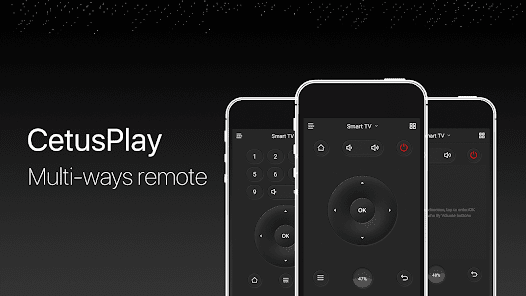
Universal Remote Control for Android TV, TV box, Chromecast, Fire TV, Fire TV Stick, KODI, Smart TV and many more. CetusPlay universal TV remote brings the flawless experience as an alternative to a TV remote with much more unbelievable functionalities. Unique TV remote to support all the possible TVs in the world providing much more than a remote.
[IMPORTANT]:
• We need more help in language localization for more users!
• Make sure both your TV and phone have been updated to the latest version.
• Mouse Mode works on Fire TV/Stick(turn on the ADB debugging), Android TV(rooted) and Android media box.
• Scroll feature only works on the Android box with CetusPlay Plugin.
What's CetusPlay?
• As a multi-function remote control app for Android TV box/Fire TV/Android TV
Features:
• Multiple navigation modes, including Direction-Pad, Touch Pad, Keyboard mode and Mouse mode
• Cast your local files(photo, videos, DOC, XLS, PPT, TXT, etc.) from your phone to TV
• Live Channels features (add local M3U file and cast to TV/Box/Stick)
• Quick launch TV apps through one click on your phone
• Clean cache and trash to speed up your TV just one click on the accelerating ball;
• Share screen capture when you watch to social media
• Help to install KODI remotely on Fire TV/Stick
Requirements:
• Streaming media player, including Android TV, such as Google Nexus Player, NVIDIA Shield TV, Fire TV/ Stick and Android TV Box like MXQ, MX Pro, H96 Pro, M8S Box. (If you have unsupported devices, please contact us with model info.)
• Android devices
Notes:
For Fire TV/Stick New Users:
• Turn on the ADB debugging and restart the Fire TV/Stick
• Install the CetusPlay phone version and connect to the Fire TV and let the CetusPlay TV version installed on the TV device.
For Fire TV/Stick Updated Users:
• Installed the latest version to your phone and TV version to your streaming media player.
• Make sure the devices on the same Wi-Fi.
• For the mouse click, apps sideload and other premium function, the ADB debugging must be enabled on your streaming media players. The Help Center in the app will guide you through the setup.
For Android TV:
• In order to enjoy it, please make sure you have done the following steps on your Android TV.
- Search and install “CetusPlay- TV version” on your TV.
- Make sure all the devices on the same Wi-Fi.
Help & Support:
• Official website: http://www.cetusplay.com/
• Facebook page: https://www.facebook.com/CetusPlay/ (Search CetusPlay by pages on Facebook)
• Or email us: help@cetusplay.com
We want to hear from you, always.
Supported Devices:
▶LeEco Android TV
▶Amazon Fire TV/Fire TV Stick
▶Nvidia Shield TV
▶Google Nexus Player
▶Globalsat GS500
▶XiaoMi Mi Box
▶ZIDOO X5/X9S/X6 PRO/X1/X9/X1
▶HiMedia Android TV box Q10 PRO/Q5 PRO/H8
▶PHILIPS Smart TV Box HMP8100
▶MELE PCG03/PCG01
▶PROBOX2
▶RIKOMAGIC MK902 II
▶MINIX NEO X7/X6/X8/Z64
▶Matricom G-Box
▶SkyStreamX Streaming Media Player
▶SkyStream ONE Box
▶RQN Android TV Box MXQ
▶Bros Unite M8S TV Box
▶KAT-TV "Elite"
▶PigflyTech Android TV Box
▶COOLEAD M8S TV Box
▶Mifanstech MXQ
▶MX III TV Box
▶DigiXstream DX4
▶Febite M8S TV Box
▶VENSMILE MXV Plus
▶Telmu MXIII-G
▶Monba M8S Set Top TV Box
▶Kudo TV KD1 Plus Android TV Box S812
▶Zenoplige MXQ
▶MXQ/MXQ PRO
▶Pigflytech MX3+ plus
▶Mansy Genuine KODI(XBMC) MX Pro
▶Jetstream Box
▶The Dragon Box
▶Tonbux SK-002
▶UBox Gen.2
▶GeekBox
▶Tronsmart
▶New NEXBOX
▶SONY Android TV
▶SHARP Android TV
▶MEMOBOX
▶NEXBOX
▶VONTAR Box
▶Tronsmart Vega Box
▶JoinWe Box
▶Andoer Box
▶Inphic Box
▶Transpeed Box
▶LeelBox
▶Vontar Box
▶Beelink Box
▶Docooler Box
▶NewBox
▶Kii Pro DVB
▶DigiXstream Box
▶Monba Box
▶Tictid Box
▶WELLWIN Nettech Box
▶Idroidnation Box
▶YFeel Box
▶Greatever Box
▶Mansy Box
▶AKASO Box
▶Globmall Box
▶DOLAMEE Box
▶Blvk Box
CetusPlay Remote Control使用ランク
使用ランクは、28日間の現在のインストール数とアクティブユーザー数を計算するSimilarwebのアルゴリズムに基づいています。
業界別 ウェブサイトカテゴリーで
ドイツ--
ツールで
ドイツ#1,444












 CetusPlay Remote Control VS.
 4月 27, 2026