

CloudBooks audio book player のアプリ分析 4月1日

CloudBooks audio book player
- Cloudbeats
- Google Play ストア
- 無料
- 音楽 & オーディオ
Take control over your listening experience with
CloudBooks – cloud audio book player.
Listen to your audiobooks, podcasts, lectures and other audio files anywhere directly from Google Drive, DropBox, OneDrive and more. Save space on your device as you no longer need to keep large audio files on your phone.
CloudBooks 🎧 it’s the easiest way to organize, stream & play your audio books on the cloud.
☁️CLOUD BOOKS PLAYER▶️
● Works with the popular cloud services for audio files streaming: Dropbox, Google Drive, OneDrive, OneDrive for Business, Box, pCloud, HiDrive. Personal clouds that support webDAV, including ownCloud and NextCloud. Network-Attached Servers (NAS) by Synology, QNAP, Western Digital (WD) and others that support webDAV protocol. These integrations make our cloud audio books and podcasts player one of the most versatile cloud books organizers.
● Plays audio files in different formats: Our free local books player offline app allows you to play mp3, m4a, and m4b audio.
● Works online and offline: Want to enjoy audio books with no wifi? Well, our no wifi books cloud player allows you that. Simply swap between offline/online mode using the dedicated toggle button in the top corner.
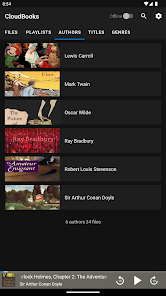
● Sync libraries: The app auto-detects all the audio on your phone and syncs all your audio libraries automatically. All tracks are grouped by author, title, genre.
📲ALL FEATURES:
・Supports most cloud services, personal clouds, and servers.
・Works without internet. Download books, podcasts, lectures, any audio file and entire folders onto the device for playback in offline mode (Premium feature)
・Remembers last played position for each file and resumes playing where you left off
・Mark tracks as finished or unfinished
・Adjust seek buttons value in the 3-60 seconds range to rewind or fast-forward
・Create playlists by adding individual file or entire folder with files.
・Sync your audio books library with connected network accounts. Sync manager will scan selected folders and add audio files to your library.
・Supports mp3, m4b and m4a (aac only, no ALAC)
・Advanced buffering technologies to provide smooth playback
・Sleep timer
・Equalizer (EQ) to adjust bass and treble settings
・Playback speed control (tempo) within the 0.5x-3.0x range. (Premium feature)
・Play offline–no internet or WiFi needed
・Cast to your Chromecast device and any compatible speaker or TV without losing sound quality (Premium feature)
・Android Auto (Premium feature)
・no ads 💎
☑️ CloudBooks is free with unlimited streaming capabilities from a single cloud account. With a one-time purchase of Premium pack you get:
・download files, as well as folders, playlists and titles
・unlimited number of connected clouds and accounts
・adjust playback speed within the 0.5x-3.0x range.
・customize seek buttons value in the 3-60 seconds range to rewind or fast-forward
・cast to compatible devices
・access content on the cloud folders shared with you
・Android Auto integration
CloudBooks audio book player使用ランク
使用ランクは、28日間の現在のインストール数とアクティブユーザー数を計算するSimilarwebのアルゴリズムに基づいています。
業界別 ウェブサイトカテゴリーで
米国--
音楽 & オーディオで
米国--



 CloudBooks audio book player VS.
 4月 1, 2026