

Inspire 20 - Analog Watch Face のアプリ分析 5月3日

Inspire 20 - Analog Watch Face
- Inspire Watch Face
- Google Play ストア
- 有料
- パーソナライズ
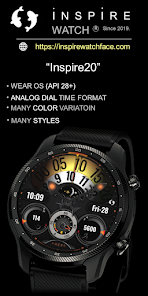
Modern Analog Watch face with many styles and original look & Display brightnes feature. Watchface has all info you need for daily use it is real eyecatcher on your smartwatch !
My name is Milos Fedak and in case you have questions before or after purchasing contact me via email fedakmilos@gmail.com or Visit https://inspirewatchface.com
Or via social media links pasted on the bottom of product description.
⌚︎ Phone App Features
This phone application is a tool to facilitate installation the watch-face on your Wear OS Smartwatch.
Only this mobile application contains adds!
⌚︎ Watch-Face App Features
- Analog time dial format
- Analog Time
- 12/24 hours digital time
- Day in Month
- Day in Week
- Battery percentage dial
- Heart rate measure dial and digital - By tabbing on area of HR zone you will measure your current HR
- Moon phase
- Steps count
- Steps Percentage dial
Direct Application Launchers
- Battery status
- Calendar
- Always ON Display supported - LOW OPR and unique look
Customization:
1 - Touch and hold display
2 - Tap on customize option
- 10 color of DIAL MINUTE HANDS
- 3 ANALOG time hands set - 4th option is watchface with NO hands
- 4 Health dials stylesa -
1 TAB TO CHANGE Brithnes intensity of Display
- 1 Tab on specific area to light on intensity of display and pick from 7 options
*some features may not be available on some watches.
Heart rate:
Heart rate is automatically measured every 10 minutes by tabbing on HR area you will get measure your current HR
Please make sure that the screen is turned on and that the watch is worn correctly on the wrist.
==========================
I am Developer since 2019 with with over 400 watchface experience. My Faces can be found on Galaxy Store, Playstore, and Huawei Health store!
Achievements:
Huawei Store:
Best of Huawei Themes Award 2021- 1st. Place Best Hybrid Watchface Style (Top 10 Seller)
Award Ceremony video link:
https://www.youtube.com/watch?v=4ZY5kq7vBL4
Galaxy Store: ( TOP 50 seller)
SOCIAL MEDIA LINKS:
Web PAGE: https://inspirewatchface.com
TELEGRAM:
https://t.me/WearOswatchfaces
FACEBOOK:
https://www.facebook.com/Digital.Unity.Watch/
INSTAGRAM:
https://www.instagram.com/digital.unity.watch/
===========================
Installation Notes:
In case you face issue with installing this watchface follow notes below or Installation guide made by Samsung:
Installation Guide link:
99) Install Wear OS™ Powered by Samsung Watch Faces - YouTube https://www.youtube.com/watch?v=vMM4Q2-rqoM&t=2s
1 - Ensure that the watch is properly connected to the phone
After a few minutes the watch face was transferred on watch : check the watch faces installed by the Wearable app on the phone.
or
2 - If you are having synchronization issues between your phone and Play Store, install the app directly from watch: search "Analog Neon" from Play Store on watch and hit on install button.
3 - The last option is to install the watch face from web browser on your PC.
Please consider that any issues on this side are NOT developer dependent. The developer has no control over the Play Store from this side.
Million times Thank you !
Inspire 20 - Analog Watch Face使用ランク
使用ランクは、28日間の現在のインストール数とアクティブユーザー数を計算するSimilarwebのアルゴリズムに基づいています。
業界別 ウェブサイトカテゴリーで
ドイツ--
パーソナライズで
ドイツ--


 Inspire 20 - Analog Watch Face VS.
 5月 3, 2026