

Shortcutter Quick Settings のアプリ分析 4月24日

Shortcutter Quick Settings
- LeeDrOiD Apps
- Google Play ストア
- 無料
- ツール
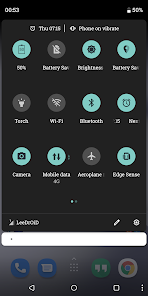
Shortcutter is the ultimate Android Quick Settings (Pull Down) Tile, Shortcut Provider, Widget Provider & Quick Access Toolbox giving you instant access to Apps, Contacts, Web Sites, Settings, Actions, Activities, Shortcuts & Services in an instant.
It's simpler than it looks & it's free to use, with additional features for less than the cost of a cup of coffee, its also under constant development!.
Access 100's of shortcuts from your home screen launcher, the system quick settings pull-down, the Shortcutter always on top Side Bar/Launcher or via Shortcutters Widget's.
Please pay attention to the guides & contact me if you need help :)
Shortcutter Side Bar / Side Launcher:
- A Floating Toolbox or Swipe out Side Bar that's always on top and accessible
- Can be positioned at the right, left or bottom of your screen.
- Over 100 shortcuts available, including up to 40 Custom tiles giving you direct access to Apps, Activities, System Shortcuts, Direct Call, Direct Dial & Web Links!
- Create your own theme, layout & design.
System Quick Settings Pull Down Tiles:
How to add them: https://youtu.be/uaPtqfXkIkE
* An abundance of additional Quick Settings tiles & services available for the standard user*
* Additional tiles for Advanced users with Settings Secure access.
* Additional root tiles also available for the power users out there.
Exposed Launcher Shortcuts (micro app's):
- Shortcutter Exposed Launcher Shortcuts allow you to toggle settings & services from your app drawer, home screen, HTC Edge Sense, Tasker & more!
A number of tiles & services require elevated permissions:
* Admin - Screen Lock.
* Accessibility - Secure Activity Detection, Power Menu, Recent Apps & Split Screen, Secure Power Menu & detecting volume key presses for Volume Panel.
Some of the Shortcuts/Tiles/Toggles available:
- Auto Sync
- App Drawer/Folder
- Bluetooth
- Battery Percentage
- Brightness Preset
- Screen Cast
- Launch Camera
- Clipboard Editor
- Clicker/Counter
- Countdown Timer
- Dice
- Data Usage
- Data Speed
- Expand Quick Settings
- Expand Notifications
- Flashlight
- Floating Calculator
- File Browser
- Font Scale
- Keyboard/IME Selector
- Location Mode: Off, Device Only, Battery Saving & High Accuracy*
- In Ear Audio
- Notification Log
- Mobile Data (Non direct)
- Multi Window
- Mute Media
- My Location
- My Play Apps
- New Tweet
- New Email
- Next Alarm
- Night Light/Desk Clock
- NFC*
- Power Menu
- Play/Pause Music
- Power Saver*
- Quick SMS
- Quick Reminder
- Recent Apps, Back & Home buttons.
- RAM Usage
- Rounded Corners
- Ring Mode
- Screen Wake AKA Caffeine
- Screen Record
-- Custom video profileçs
- Screenshot - High Res
--- Custom save location for screenshots & recordings.
--- Notifications with View, Share & Delete actions
- Screen Timeout
- Screen Brightness Mode
- Speaker Audio
- Screen Filter AKA Night Mode
- Screen Lock - *Requires Device Admin*
- Screen Orientation
- Stopwatch
- Tethering & HotSpot
- Touch Vibration
- Custom Pie style volume Panel
- Unknown Sources
- Web Search
- WiFi
- WiFi Hotspot
- Assistant
- VPN
- Weather
- SystemUI Tuner
- Custom Tiles - Add a shortcut to any application, activity, shortcut on your device, assign a web address/search term, direct dial, direct message or shell command (Root).
With Settings Secure Access (Enabled with a PC command):
- ADB
- Data Roaming
- Ambient Display
- Heads Up Notifications
- Immersive Mode/Expanded Desktop
- Keep Screen On While Charging
- Monochrome
Additional ROOT ONLY Tiles:
- Mobile Network Mode
- Advanced Power Menu
- Assign shell commands to custom tiles
Add an extra layer of security in your quick settings pulldown, replace your existing tiles with shortcutter tiles & enable the Lock Shortcutter Pull-Down Tiles option!
Some functionality may be impacted by manufacturer changes
Shortcutter Quick Settings使用ランク
使用ランクは、28日間の現在のインストール数とアクティブユーザー数を計算するSimilarwebのアルゴリズムに基づいています。
業界別 ウェブサイトカテゴリーで
米国--
ツールで
米国--




 Shortcutter Quick Settings VS.
 4月 24, 2026