

NFC Alarm Clock のアプリ分析 3月28日

NFC Alarm Clock
- Gabe Gonzalez
- Google Play ストア
- 無料
- 生産性
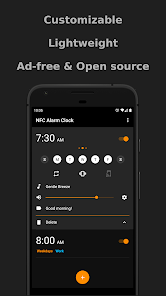
Customize how your alarms look, easily create/delete alarms, and more. Each alarm can be configured however you want to use it.
For those that struggle to wake up, you can restrict the volume or have it gradually increase when your alarm goes off. You can also use an NFC card or tag to dismiss your alarm.
See the full list of features below for a more detailed look into all the things you can do.
=======
Features
=======
• Edit and view alarms all in one screen.
• Swipe left to delete an alarm.
• Swipe right to copy an alarm.
• Play music from your phone to wake up. Can even choose to play all the music in a folder.
• Use NFC to dismiss an alarm. This is optional and can be set on a per-alarm basis. Found by selecting the gear icon next to the volume slider of an alarm.
• Gradually increase the volume when your alarm goes off. This is optional and can be set on a per-alarm basis. Found by selecting the gear icon next to the volume slider of an alarm.
• Restrict changing the volume when your alarm goes off. This is optional and can be set on a per-alarm basis. Found by selecting the gear icon next to the volume slider of an alarm.
• Text-to-speech when your alarm goes off. It will say the current time to you at whatever cadence you choose. This is optional and can be set on a per-alarm basis. Found by selecting the gear icon next to the volume slider of an alarm.
• Choose which audio source you want the alarm sound to play out of (Alarm, Call, Music, Notification, Ringtone). This is optional and can be set on a per-alarm basis. Found by selecting the gear icon next to the volume slider of an alarm.
• Customize the colors of: the theme, name of the alarm, days in which the alarm runs, time, and AM/PM. Found in Settings -> Appearance.
• View statistics of how many alarms you have dismissed/snoozed/missed, and how many you have created/deleted.
==========
Permissions
==========
* NFC *
(Optional) Allow the app to detect NFC tags.
* Storage *
(Optional) Read music that is stored on the phone. You are prompted to enable this permission if and only if you choose to play music as the alarm ringtone. Otherwise, this permission is unused.
* Vibrate *
(Optional) Allow the app to vibrate the phone.
* Startup *
(Required) Restore alarms when the phone is turned on. By default, Android will delete alarms when the phone is turned off.
* Wakelock *
(Required) Prevent the phone from sleeping so that an activated alarm will continue to go off.
NFC Alarm Clock使用ランク
使用ランクは、28日間の現在のインストール数とアクティブユーザー数を計算するSimilarwebのアルゴリズムに基づいています。
業界別 ウェブサイトカテゴリーで
米国--
生産性で
米国#2,423















 NFC Alarm Clock VS.
 3月 28, 2026