

LogoLicious Add Your Logo App のアプリ分析 4月17日

LogoLicious Add Your Logo App
- The Laughing Dutchmen
- Google Play ストア
- 無料
- 写真
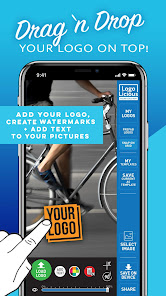
Simple and effective! LogoLicious, Add Your Logo App is the easiest solution to quickly add your own logo, watermark, and text to your images. Fast and functional, it's the perfect tool to overlay, personalize, promote, and protect your pictures.
Especially created for the 'quick let me post this' situations: Simply load your logo straight from your phone into the app; drag & drop it on top of your photo; and post your watermarked images online, on the go!
• High Resolution: No loss of photo quality • No annoying ads • No placement limitations • Drag 'n drop • Transparency (watermarking) functionality • Add logo(s) • Add text • Easy interface • Super Fast • Protective X-Grid • Save Templates • Great user experience
Hustle without the hassle!
A time-saving and productivity app built and designed for small business owners, entrepreneurs, artists, designers, photographers, tattoo artists, social media managers and influencers.
Full disclosure: LogoLicious is absolutely advertising free at all times! Yet a voluntary one time in-app purchase is requested after multiple times (5x) of usage, but no feature restrictions whatsoever before, or after(!) this period - its just delaying the wait while saving •
Simply load it, drag it, and drop it on top:
Created for the 'on the road' situations. LogoLicious is the #1 mobile branding tool. A photo watermark app, 'logo adder' and 'text over photo' all in one - that allows you to customize your photos on the run and apply your branding on the fly.
It's efficient, user-friendly, fast and simple;
This app is made by creatives, for creatives: No fuss, no muss: Add your own logo (png/gif/jpg), hashtag or handle to your images in a matter of seconds.
You can add your handle or url, rotate items and change transparency. We also built a template function so you can save your watermark setup as a template to speed up your process the next time!
What Does It Do: Primary features
- Upload your own logo to the app (no size restrictions)
- Supports .png .gif and .jpg (logo)files
- Create templates! Save your previous setup (logo + text) as template for future images
• EXIF data embedded!
• Take pictures with camera
• Add a protective snap-on X-grid on top of any image with just 1 click
• Change the transparency of your logo, to create watermarks
• HR - No resolution downgrade! LogoLicious matches your logo to the resolution of your photo
• LR - Save space and opt to save your image in low resolution
• Add your own text + change color
• Choose from a variety of fonts or add your own font (.ttf)
• Rename your image
• Add multiple logos
• Easy access to your auto-saved logos
• Crop your images
• Quick sharing via social channels
• Perfect Alignment > Level your logo or text to horizon (+0º )
Tips:
• Before you start, make sure your logo is available on your device.
TIP: email it to yourself and save to your device or download it from a cloud service
• Place your logo: Simply drag it wherever, scale it up or down with a 2 finger pinch/zoom motion
• Hit the 'Save current as template' button > Next time you use the LogoLicious app, no need to add your logo first, just load your previous template with one click!
• To rotate your logo use fingers or hit the rotate button. (To undo rotation and align: hit the +0º button)
• Use the slider at the bottom of the screen to change the opacity (transparency) of your photo watermark, logo or text.
Purely a logo and watermark focussed app (no distractions or hidden costs) and especially made for fast-paced needs of small businesses, photographers, artists and influencers
Credit where credit is due: Add text and photo watermarks to overlay images and protect your copyright by adding your own logo to your photos.
Get recognized!
LogoLicious Add Your Logo App使用ランク
使用ランクは、28日間の現在のインストール数とアクティブユーザー数を計算するSimilarwebのアルゴリズムに基づいています。
業界別 ウェブサイトカテゴリーで
米国--
写真で
米国--




 LogoLicious Add Your Logo App VS.
 4月 17, 2026