

OM Image Share のアプリ分析 2月23日

OM Image Share
- OM Digital Solutions
- Google Play ストア
- 無料
- 写真
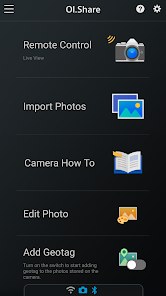
OM Image Share (OI.Share) is an app required for wirelessly importing photos captured on an OM Digital Solutions camera. In addition to importing photos, you can use your smartphone as a remote controller for remote shooting. This smartphone app makes photography more enjoyable than ever, and offers new ways to use your camera.
1. Easily Import Photos to Your Smartphone
With OI.Share, you can view photos stored on the camera and import them to your smartphone. Simply select photos you want to share ahead of time on the camera (Share Order) to automatically import them when connected to your smartphone via Wi-Fi. With a Bluetooth and Wi-Fi ready camera, you can use OI.Share on its own to import photos for greater convenience.
2. Two Remote Shooting Modes
With remote shooting, you can view Live View images on your smartphone screen while executing shooting techniques in Live View, and in Remote Shutter, you can adjust shooting settings on the camera while using your smartphone to activate the shutter release.
3. Camera How To Offers Shooting Techniques with Tutorial Videos
Camera How To shows how to create beautiful bokeh, how to use Art Filter, and other shooting techniques in easy-to-understand videos. You can also view the camera manual.
* Supported on some models only.
4. Easy Connection
To connect your camera and smartphone, simply scan the QR code displayed on the camera LCD screen with OI.Share. That is all you need to do to complete setup.
* The camera whose QR code is scanned is registered to the app.
* To connect another camera, you must repeat the QR code is scanned step.
5. Display images and track data on your smartphone
During your journey, send your camera's track data by Wi-Fi to your smartphone and you will be able to check the progress that you have made on your journey thus far. Track data will be displayed together with images for easy identification.
* Display of movies and altitude/depth data is only possible when using compatible cameras. Compatible cameras: OM-D E-M1X, TG-6, TG-5, TG-Tracker
6. Organize track data and images on your smartphone
Manage your images and track data imported to your smartphone as single Activities. Relive the excitement of the moment and the feeling of accomplishment by viewing the track data together with your images.
7. Add location information
By simply transferring the GPS log recorded with a smartphone to the camera, location information can be added to photos captured with a compatible camera with built-in Wi-Fi.
When connected via Bluetooth, geotags are added during shooting.
* Supported on some models only.
8. Art Filter
Select from 31 different filter options and 8 supplemental effects to expand your range of expression. Add Art Effects to your Art Filter photos for even more expressive imagery.
* Available Art Effects may differ depending on the Art Filter applied.
9. Colour Creator
With Color Creator, you can control the hue and color saturation for more dramatic photo finishes. Operate the Color Ring that appears on the screen to adjust the hues (30 levels) and saturation (8 levels) of the colors in your photo.
10. Highlight and Shadow Control
Highlight & Shadow Control lets you add variation to photos by controlling light and shadow sections of the image. Highlights, mid-range, and shadows can be individually adjusted using the tone curve that appears on the screen.
11. Dehaze and Clarity
You can use popular OM Workspace functions "Dehaze" and "Clarity" to easily enhance photo textures and give images a clearer finish.
* This app is not guaranteed to work on all Smartphone and tablet devices.
* Available functions will differ by camera.
* Wi-Fi is a registered trademark of the Wi-Fi Alliance.
* The Wi-Fi CERTIFIED Logo is a certification mark of the Wi-Fi Alliance.
* The Bluetooth® word mark and logos are registered trademarks owned by the Bluetooth SIG, Inc. and any use of such marks by OM Digital Solutions Corporation is under license.
OM Image Share使用ランク
使用ランクは、28日間の現在のインストール数とアクティブユーザー数を計算するSimilarwebのアルゴリズムに基づいています。
業界別 ウェブサイトカテゴリーで
米国--
写真で
米国#1,037





















 OM Image Share VS.
 2月 23, 2026