

Samsung Knox Capture のアプリ分析 3月31日

Samsung Knox Capture
- Samsung Electronics Co., Ltd.
- Google Play ストア
- 無料
- ビジネス
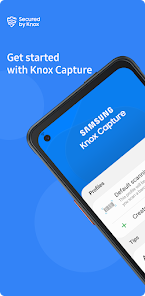
Samsung Knox Capture is a barcode scanner solution, data wedge, and a keyboard wedge all in one. Easily capture, process and transfer data (wedge) into business application(s) without writing a single line of code.
- Turn the camera on your Samsung rugged device into an enterprise-grade barcode scanner solution in just a few steps.
- Data capture and real-time entry (wedging) to business applications (native, web, hybrid) without writing code.
- Configure various scanning configurations into your applications to begin capturing 1D/2D barcodes immediately.
- Seamless assignment of the hardware buttons so end users can trigger scanning without any hassles increasing productivity.
- Enable a keyboard wedge on the native Samsung keyboard so you can securely trigger a scan right from the keyboard.
- Export settings easily, and push to as many devices quickly from an EMM.
- Knox Capture supports all major barcode symbologies.
* 2D Barcodes :QR Code, Micro QR Code, Aztec, Maxicode, Datamatrix,
PDF417, DotCode
* 1D Barcode : UPC/EAN, Code39, Code128, Code11, Code25, Code93,
Codabar, MSI Plessey, Interleaved 2 of 5 (ITF), GS1 Databar
* Terms and conditions apply.
This is an enterprise business app and all features are accessible with the purchase of a trial or commercial license. If installed and used on an enterprise device, an IT administrator can manage the application.
1. Knox Capture Product Landing Page
- https://www.samsungknox.com/en/solutions/it-solutions/knox-capture
2. Blog Posting to introduce Knox Capture
- https://www.samsungknox.com/en/blog/a-new-version-of-knox-capture-now-packaged-with-samsung-knox-suite
3. Knox Capture Admin Guide
- https://docs.samsungknox.com/admin/knox-capture/welcome.htm
※ Application permissions
The following permissions are required for the app service. You can still use the app's basic functions without allowing the optional permissions.
[Optional permissions]
- Camera: Used to use camera-based barcode scanning.
- Storage (Android 10 and below): Used to save and import configurations.
- Nearby devices: Used to connect Bluetooth devices and output data captured via Bluetooth.
- Notifications (Android 13 and above): Used to provide notifications for connected devices and features.
Previously allowed permissions can be reset on Apps menu in device settings after software update.
Samsung Knox Capture使用ランク
使用ランクは、28日間の現在のインストール数とアクティブユーザー数を計算するSimilarwebのアルゴリズムに基づいています。
業界別 ウェブサイトカテゴリーで
米国--
ビジネスで
米国#2,536

















 Samsung Knox Capture VS.
 3月 31, 2026