

Screenshot stamper のアプリ分析 2月21日

Screenshot stamper
- All Excellent Apps
- Google Play ストア
- 無料
- 生産性
Screenshot stamper is a simple but multiple solution based Application, which gives you options to capture screenshot, click longshots, add markup, stitch picture and to add date timestamp on screenshot.
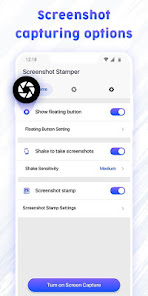
This stamping on screenshot app provides a floating button or shaking device options to capture screenshots. App also allows cropping, editing, stitching on screenshots. To add device info and datetime stamps are among interesting features of the app.
It can be widely used by Quality analysis developers and manual testers as a QA testing tool to check and record any functions and programs operating on mobile phones, tablet or any other android devices. As the app makes sure to provide Date time, App details, Device details on screenshot itself.
Key features of Screenshot stamper Application:
Floating button:
Easy button to capture a screenshot just by one click, the button is called floating as it can be moved anywhere on screen and it stays on screen above everything. Easy screenshot capture tool.
💫 Background color
💫 Opacity
💫 Floating button Size
💫 Auto-hide to the side
💫 Lock screenshot floater position
Shake to take screenshots:
Shake sensitive Feature to take a screenshot by simply shaking device
Screenshot stamp:
Get App details, Device details and date time stamp on screenshot with formatting options.
💫 Stamp color
💫 Stamp background Color
💫 App details
💫 Device details
💫 Stamp image
Screenshot Markup:
🕀 Crop
→Ratio - fit image, 3:4, 4:3, 9:16, 7:5, or free
→Shape - square, circle, circle-square
→Rotation- rotate left or rotate right
🕀 Edit & Annotate
→Text - Add text on photo with vivid color options
→Emoji - Add Emojis on screenshot
→Draw - Draw with colorful brush having changeable size and opacity
→Mosaic - blur the area which you don’t want to show with rearranged pixels
→Spotlight - Highlight the area with spotlight of different shapes
→Filter - various filter options to glorify screenshot
🕀 Stitch:
fine tune the seam for pixel perfect
Configuration:
→Direction: Vertical or horizontal Directions
→Sort: sort out the screen captures
→Add image: You can stitch any image from gallery along with the screenshot
Extra features:
💠 Image File format : JPG/ PNG formats available
💠 Image file quality: Scale out the quality of image you desire
💠 Filename prefix: Save files with prefix for easy sorting
💠 Sound of capture: Turn ON/OFF the sound of capturing screenshot
Why to have Screenshot Stamper Application?
→ Supports longshot and gives stitching options
→ Easy annotation with multiple tools
→ Photo Markup facilities like photo editor
→ High quality Screenshot images
→ Snipping tools for screen grabber
→ Free screen capture with ample of editing options
→ First time ever app to add date timestamp on screenshot
→ capture a longshot. if you have a scrolling page, then it will capture the whole page, you can stitch the shot as required.
→ Get device info & App info on screenshot
Screenshot stamper is safe to use as No privacy will be harmed, and no secured pages will get screen captured. If you have any feedback or suggestions, feel free to contact us on allexcellentapps@gmail.com.
Screenshot stamper使用ランク
使用ランクは、28日間の現在のインストール数とアクティブユーザー数を計算するSimilarwebのアルゴリズムに基づいています。
業界別 ウェブサイトカテゴリーで
米国--
生産性で
米国#3,061


















 Screenshot stamper VS.
 2月 21, 2026