

SecSign のアプリ分析 4月30日

SecSign
- SecSign Technologies Inc.
- Google Play ストア
- 無料
- ツール
SecSign ID - 2 factor authentication (2fa, two factor authentication) for secure logins on websites like WordPress, JIRA, Joomla, and 2 step verification for Windows Server Radius and VPN
• Log into websites, applications, and systems without passwords and with the total security of out-of-band mobile authentication.
• For the login you only enter your user name (SecSign ID) and confirm one access symbol (no entry of confidential credentials)
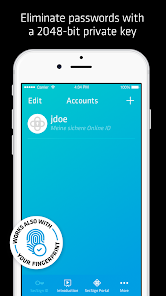
• 2048-bit encrypted key pairs and public key infrastructure (PKI) provide identity access management (IAM) that is completely immune from login hacking, phishing, and malware.
• No passwords or sensitive user information are ever stored on a login server.
• Integrate SecSign ID 2FA into your own website, application, or systems with our free and unlimited cloud service.
• Operate your own 2 factor on-premise server behind your firewall in your data center
• Use SecSign ID 2FA for free access to the SecSign Portal, the truly secure solution for online collaboration with encrypted file sharing, file storage, and messaging.
Features
• Eliminates passwords and password theft
• Quick and easy mobile authentication via 4-digit PIN!
• No hardware or infrastructure required
• Free, unlimited cloud service through our Secure Trust Center Servers
• No need to use or remember passwords, retype SMS codes, or scan QR codes
• High security and advanced cryptography on all levels
• Also available as an on-premise installation for enterprise IAM
Technical Details
• 2048-bit asymmetric RSA key pairs
• Public key stored and used on the ID server
• Private key stored securely on smartphone
• Brute force resistant private key storage
• No private key information stored on the ID server
• Sensitive credentials are never entered through user logins
• Confidential credentials are never transmitted or stored on a server
• High availability through redundant remote failover servers
• Multi-tier secured server architecture
• On-premise solutions available for installation on your own servers
How to Create Your SecSign ID
1. Install the app
2. Choose a unique user name
3. Choose a short PIN to secure your SecSign ID on your mobile phone
How to Start Using SecSign ID
• Try the sample login on our website or log into our free and completely secure portal for encrypted file sharing and messaging, the SecSign Portal, at http://portal.secsign.com.
• Developers can download our free plugins and integrate free, unlimited use of SecSign ID for your websites and applications. Visit https://www.secsign.com/plugins/
• Use it to protect your networks, websites, platforms, or devices
• Use it with SecSign Portal for secure file storage, file sharing, and messaging
• Deploy your own in-house SecSign ID server for enterprise security
SecSign ID is free for everyone and free of advertising.
SecSign ID is a product of SecSign Technologies, a sister company of SecCommerce GmbH of Hamburg, Germany. We have over 17 years of experience in developing strong cryptography and highly sophisticated security software products for governments, public institutions, and private companies.
SecSign使用ランク
使用ランクは、28日間の現在のインストール数とアクティブユーザー数を計算するSimilarwebのアルゴリズムに基づいています。
業界別 ウェブサイトカテゴリーで
ドイツ--
ツールで
ドイツ--











 SecSign VS.
 4月 30, 2026