

eDrawings のアプリ分析 3月26日

eDrawings
- SolidWorks
- Google Play ストア
- 有料
- 生産性
eDrawings Pro with in-app purchase.
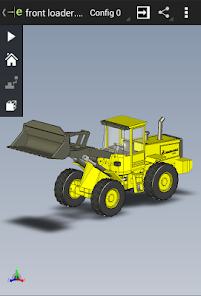
eDrawings® is the only CAD viewer on Android phones and tablets that allows you to view native eDrawings files as well as native SolidWorks® parts, assemblies and drawings files.
eDrawings is the email-enabled communication tool that dramatically eases sharing of product design information. You can load and send files via email to collaborate more effectively with everyone involved in product development, including people who are not regular CAD software users to interpret and understand 2D and 3D designs.
Multi-touch gestures let you pan, zoom, and rotate models easily. eDrawings also supports drawing sheets, and exploded views for eDrawings files published from SolidWorks®.
Features:
* Intuitive and easy-to-use user interface
* Open 3D (EASM, EPRT, SLDASM, SLDPRT, IGES, IGS, JT, STEP, STP, IFC), 2D (EDRW, SLDDRW, DWG, DXF) and associated files from any source: email attachments, cloud storage services (Dropbox™, SkyDrive®, Google Drive, Hightail®, and others), web and FTP sites and network folders.
* Zoom, pan and rotate your 2D or 3D CAD data using multi-touch
* Animate 3D standard views
* Browse your 2D drawing sheets
* View your designs in full screen and double tap to fit it on screen
* Sample files included
Upgrade to eDrawings Pro using In-app purchase and enable new capabilities :
* Measure your designs (distance, angles, lengths, point to point and more)
* Dynamically view cross sections of your models in XY, YZ, or ZX directions from both sides and easily drag the cross section plane
* Create markups in your designs, including text notes and freehand notations
* Share marked up eDrawings files with others for review and further comments. All markups with history are saved within the eDrawings file.
Thanks for using eDrawings! Don't forget to review the app. Your feedback is important to us! Please reach out to support@edrawingsviewer.com with any suggestions.
Known Issue with Augmented Reality:
Some devices clipped the Get Marker buttons and made them unavailable, you can now access them from the settings button in the top right corner when in AR mode
For more information, visit http://www.solidworks.com or http://www.edrawingsviewer.com
eDrawings使用ランク
使用ランクは、28日間の現在のインストール数とアクティブユーザー数を計算するSimilarwebのアルゴリズムに基づいています。
業界別 ウェブサイトカテゴリーで
米国#627
生産性で
米国#76


















 eDrawings VS.
 3月 26, 2026