

COPIC Collection のアプリ分析 3月26日

COPIC Collection
- Too Corporation
- Google Play ストア
- 無料
- アート & デザイン
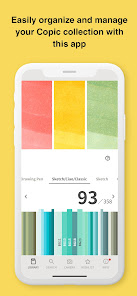
Copic Collection is a free smartphone app that lets you easily manage and search Copic products that you currently own or are planning to purchase.
New features in the latest version of Copic Collection:
'- Easily register products using barcodes:
You can now scan barcodes to register your Copic products.
For sets, you can register all Copic products included in the set by scanning the barcode on the package.
You can easily view your Copic products registered on the app from a color bar list, making it easier to find the next color you may be looking for.
Register Multiliner products
Copic products other than Copic markers (Multiliner Pen/Multiliner SP Pen/Copic Drawing Pen/Gasen-Fude Brush Pen) can also now be registered in your list.
Multiliner Pen products can be registered by color and line width.
Easier-to-understand support page
If you have any questions about how to use the app, you can now open a tutorial from the "?" mark and receive explanations for each feature in the app.
How to use Copic Collection
View suggestions with the color picker feature
Do you ever find yourself wondering what color should be used to color particular areas?
Copic Collection can help you with that. The app allows you to load photos, illustrations and other images from "Camera" within the app, and will display a list of recommended Copic colors that best fits a specified area of an image.
If you select a color from the list and tap the star icon (☆), the chosen color will be displayed in the "WISH LIST." You can use this feature as a memo for your next purchase.
- Your own MY COLOR MEMO
On the detail screen for each color, you can tap the MEMO icon to make notes about the corresponding color.
For example, you can leave notes for a particular color such as "Used to color my favorite manga character" and "Color was used by a popular artist in a video."
- Tag the colors you used in a piece
You can load images of artwork created with Copic markers from "Camera" within the app and add "Color Tags" that indicate the colors that were used. You can then save the image with the added color tags.
You can save the image as reference for your own use, or share the image with Color Tags on social media, etc.
COPIC Collection使用ランク
使用ランクは、28日間の現在のインストール数とアクティブユーザー数を計算するSimilarwebのアルゴリズムに基づいています。
業界別 ウェブサイトカテゴリーで
米国--
アート & デザインで
米国--


 COPIC Collection VS.
 3月 26, 2026