

Save Web Page: Read it offline のアプリ分析 4月20日

Save Web Page: Read it offline
- WickeyWorks
- Google Play ストア
- 無料
- ツール
A free screen capture application that saves web pages as they are and lets you view them offline anytime.
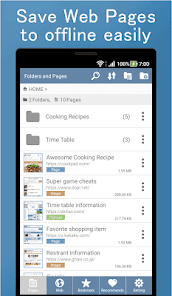
You can easily save pages such as SNS posts, recipes, and timetables with one touch.
Browse comfortably with full screen mode.
You can back up and restore data, so even if you change the device model, you can take over data for peace of mind.
All features are free.
*** Main features ***
- Save web page (you can choose 3 ways)
- Save as it is (MHTML format)
- Save as image (save the entire page as a screenshot)
- Save only the displayed part as an image
- View saved pages offline anytime
- Complete full screen mode
- Data backup & restore
- Web browser
- Management of stored pages (folder, sort, search, Batch delete / move)
- Batch delete, batch folder move (long press)
- Bookmark function
- Call from other browser app and display page
- MHTML viewer
- Change the color in the app freely
*** Convenient usage ***
- Once saved pages, you can view it offline many times without using communication charges even without radio waves.
- Pages that require login can also be saved using the in-app browser function.
- Feel free to save the page and use it as a Read It Later application.
- Saved pages can be viewed even if pages on the web are lost.
- It is very convenient if you save pages such as frequently viewed recipes and timetables.
SNS articles such as Instagram and Twitter, cooking recipes, gourmet information, train and bus timetables, favorite online shops, blog articles, beauty cosmetics information, housing information, lyrics, game cheats pages, etc.
If you save your favorite pages you often view, you can view them immediately without spending on communication charges.
- It is very comfortable to be able to display a web page on the whole screen by using the full screen mode completely!
- You can open MHTML file.
- You can choose from three storage formats, so you can save space on your device or capture only the part you need.
- Since there is a data backup and restore function, saved page data can be used as it is even if your device model is changed.
- You can freely change the color in the app. Please use the app in your favorite color.
*** How to call from browser app ***
1. Select [Share] or [Share Page] from the browser application menu
2. Select [Save Web Page]
3. [Save Web Page] will launched. So save the page.
Clip web page, make web archive easily.
Save Web Page - Save Pages for Offline reading and Read it later.
Save Web Page: Read it offline使用ランク
使用ランクは、28日間の現在のインストール数とアクティブユーザー数を計算するSimilarwebのアルゴリズムに基づいています。
業界別 ウェブサイトカテゴリーで
米国--
ツールで
米国--


 Save Web Page: Read it offline VS.
 4月 20, 2026