

Enuresis Diary のアプリ分析 4月20日

Enuresis Diary
- 株式会社GalleryApp
- Google Play ストア
- 無料
- 医学
Enuresis Diary is for storing daily records of child's behavior for the treatment.
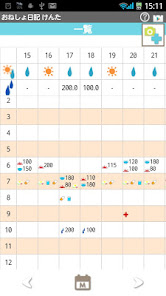
You can manage one or more children separetly and see all the records with a table sheet. Switch the table display to daily, weekly and monthly.
Just tapping behavior icons to store records. It is so simple. Dry and wet icons will be displayed on the calendar so you can understand the behaivor at a glance.
You can send the table sheet as a CSV file by email and retrieve data in a spreadsheet software.
*Bedwetting Diary does not sync with Google Calendar.
Enuresis Diary Howto Guide
*Menu Button of the Phone*
1. Search:Search the records by a keyword.
2. Import SD card: Import data from SD card.
3. Export SD card: Export data to SD card.
4. Export Cloud:You can backup data to Google Drive and Dropbox.*Please install either software from the market.
6. Copy to SD card: Copy the data to internal and external SD card.
7. Password: Set the password.
8. Recovery: Use this function when you want to return to the previous data. *Please note that the current data will be deleted when you use this function.
*Add child names*
You can save one or more child names and manage the records separately for each child.
1. Launch Enuresis Diary. Opening screen is "Add" window.
2. Enter the name, select a photo, sex and birthday→tap "Save" and return to the calendar.
3. You can add more names, edit and select the name by tapping the top-right square button of the calendar.
4. Selected child name is displayed on the title bar.
*How to save daily records*
1. Tap + ("Add") button of the calendar.
2. Move to Daily To-Do.
ーーAction Tagーー
3. Action tag is selected. Tap behavior icons to save records.
4. Let's save first "Dry" or "Wet" for the day. The seleted icon from those will be displayed on the calendar so that you can understand the behavior at a glance.
5. Save records by tapping each icon. After saving records, the saved data will be appeared below the calendar.
6. A long press to edit the behavior icons. Move to edit window.
<Edit window's buttons>
Pencil button:After editing all the data tap pencil button to save.
Back button:Return to Daily To-Do.
Delete button:Delete the behavior icon.
ーーCondition Tagーー
1. Tap Condition tag.
2. Sleeping hours will be calculated when there are entries of wake-up and bed time.
3. Tap face marks to save bed time mood of the child.
4. You can use a memo as a journal.
5. Return to the calendar by pressing 「Back」button of the mobile phone.
*Buttons of the calendar*
From top
---top right---
1. 「Help」button: Move to this description web page of GalleryApp.
2. 「Market」button::Recommendation of other GalleryApp's apps.
---below Help and Market button---
3. 「Add」button:Add, edit and select the name of the child.
---middle right of the calendar---
4. 「List」button: Switch to a list display.
5. 「Weekly」button: Switch to a weekly display.
---middle of the calendar---
6. 「Arrow」:Switch the display. You can see the list in a full screen.
Bottom of the calendar
---from left^---
7. 「Add」button:Save daily records of the child.
8. 「Today」button: Go back to today's date.
9. 「Left」「Right」button: Move dates right and left.。
10.「Graph」button:You can see graphs of each behavior.
11. 「Table」button:You can see the data with table sheet.
*Table sheet*
Row:Date
Column:Time
---From top row---
1. Dry or Wet of the day.
2. The sum of urination he/she holded.
3. Time line.
4. The sum of wake up urination.
5. The sum of diaper urination.
6. The sum of diaper and wake up urination (Night time urination).
7. The sum of the total urination.
8. Hospital vists records.
---Bottom buttons---
From left
1. Move to the previous day, week and month.
2. Switch the display to daily, weekly and monthly.
3. Move to the next day, week and month.
*In the table sheet screen, press "Menu" button of the mobile. You can send the table sheet as a CSV file by email and retrieve data in a spreadsheet software.
Enuresis Diary使用ランク
使用ランクは、28日間の現在のインストール数とアクティブユーザー数を計算するSimilarwebのアルゴリズムに基づいています。
業界別 ウェブサイトカテゴリーで
米国--
医学で
米国--


 Enuresis Diary VS.
 4月 20, 2026