

ISO Extractor: ISO File Opener のアプリ分析 4月21日

ISO Extractor: ISO File Opener
- Marine Sol
- Google Play ストア
- 無料
- 生産性
Looking for a versatile and powerful ISO file extractor? Your search ends here! Introducing the ISO File Extractor, your one-stop solution for managing and working with ISO disk images effortlessly.
ISO files are disk image files that contain the complete structure and contents of a CD, DVD, or Blu-ray disc. These files are commonly used for distributing software, games, and other large datasets because they can be easily archived and shared. ISO Manager is a powerful and user-friendly application designed to help you extract the contents of ISO image files with ease. Whether you have a game, software, or multimedia content stored in an ISO file, an ISO reader simplifies the process of accessing and utilizing the data within.
Features of ISO Extractor: ISO File Opener
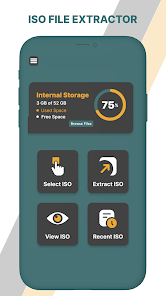
1. The interface of the iso file download has four main features; including select ISO, extract ISO, view ISO, and recent ISO. It further allows the user to determine the internal storage of the device. They can determine the used space as well as the free space of the device using the decompressed files app. The unrar rar zip file extractor / ISO open file is a mobile-friendly app and is quite convenient for the user. The UI of the Extract ISO files is easy to navigate and requires no professional support.
2. Free unzip files enable seamless ISO Handling, saying goodbye to the hassle of dealing with ISO files. ISO archive tool simplifies the process, allowing you to extract, open, view, and manage ISO images with just a few taps.
3. ISO image extractor / iso for Android permits effortless extraction. Extracting files from ISO images has never been easier. With a user-friendly interface, you can extract the entire ISO and folders to your device.
4. Experience lightning-fast extraction speeds through unarchiver tool / ISO opener, even with large ISO files. The iso extractor and file opener are optimized for efficiency without compromising quality.
5. The recent ISO feature of the ISO image viewer allows the user to open the recently opened files directly from the app. Using this feature, one can delete and share the file without closing the iso file extractor.
6. Your data privacy is our top priority. ISO File Extractor does not collect or store your data, ensuring a secure and private ISO management experience.
How to Use ISO Extractor: ISO File Opener
1. If the user wishes to view the ISO files, they must click on the select ISO tab of isoi.
2. Finally, the recently viewed files can easily be found in the recent ISO tab. The user needs to select the tab to open it.
ISO Extractor: ISO File Opener使用ランク
使用ランクは、28日間の現在のインストール数とアクティブユーザー数を計算するSimilarwebのアルゴリズムに基づいています。
業界別 ウェブサイトカテゴリーで
米国--
生産性で
米国--













 ISO Extractor: ISO File Opener
4月 21, 2026