

Jota+ (Text Editor) のアプリ分析 5月2日
Jota+ (Text Editor)
- Aquamarine Networks.
- Google Play ストア
- 無料
- ツール
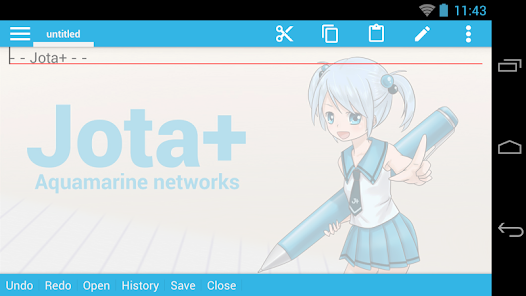
Jota+ is the best text editor for Android.
Jota+ is easy to use. And have the great ability and great performance.
For documentation, for programming, Jota+ provides the best experience of a text editing.
★features of Jota+
- Support multi-file feature.
- Support 1 million characters.
- Support many character codes and Auto-Detect feature.
- Search/Replace (Support Regular Expression)
- Highlight searching words.
- Support font customize. (Proportional / Mono Space / ttf,otf font )
- Support Install-shortcut feature.
- Auto save.
- Show Line numbers.
- Show Tab/Line-break mark.
- Realtime characters/words/lines Counter.
- Customizable Toolbar.
- Syntax highlight support many languages. (awk,X11-basic,css,c/c++,java,javascript,lua,Objective-C,pascal,php,python,ruby,sh,tex,xml,html)
And it's customizable.
- Customizable Fixed Phrase management.
- Clipboard management.
- Built in file browser with bookmark management.
- Free Wallpaper by Non Miyabi. http://sites.google.com/site/nonsillustgallery/
- Detect file modification.
- Support physical-keyboard devices/Bluetooth or USB Keyboard/Chromebook.
- Safe app without any evil permission requests.
- Support many kinds of Cloud Storage Services. ( Dropbox, OneDrive etc...)
- Rescue Center for realtime backup.
★FREE version is for trial, so some features are locked.
But you can use free version as a Text editor with sufficient capabilities.
You can buy PRO-KEY app from Google Play to unlock extra features.
▼Firebase Crashlytics and Mobile Ads are built into the app.
Please confirm our privacy policy.
▼Warning.
We prohibit the distribution of Jota+ on places other than Google Play.
It has been confirmed that the pirated app mixed malware has been distributed.
And we do not provide support to pirated apps.
Please be careful.
▼We won't reply to anything on Review Comments.
If you have troubles or suggestions, send us an email.
▼FAQ
Q. Can't save on SD-Card or USB-Flash.
A. They are supported by Storage Access Framework.
see Preferences>File>”Use Android's standard File Picker" and check it.
Q. I can't find my file in file browser.
A. Please check off "Text File Only" in side menu.
Q. I bought PRO-KEY, but couldn't activate.
A. Try following...
Make sure that your device is connected to the internet and logged into Google.
Confirm that PRO-KEY is installed in System Settings.
Click Menu - Preferences - Activate PRO-KEY.
reboot the device and start Jota+.
uninstall and re-install Jota+ or PRO-KEY.
- Some devices have Background-Task-Killer added by OEM vendors.
That kind of feature may break inter appllication communications.
Please set Jota+ and PRO-KEY to permission list.
- If you have troubles with the activation, please send an email to the developer.
Q. How to hide Floating Action Buttons.
A. See Preferences > Floating Button. Then select 'no-assign'.
Q. App exits before save my file!
Q. Overwritten my file!
A. see Preferences > Rescue Center, you may find your file.
Q. How to use in-app file picker on Android 11+. (for Connector plugins)
A. see Preferences > Files > Use Android's standard file picker.
Turn off it, then select a folder for in-app file picker.
The Root folder nor Download folder can't be selected.
To create new folder and select it is recommended.
Then you can use in-app file picker.
▼Help for Chromebook and Bluetooth Keyboard
- alt+F menu
- alt+D contextmenu
- ctrl+tab sidemenu
- ctrl+PageUp/PageDown switch tab
- see Shortcut Settings to bind ctrl+alphabet key
- cant bind ctrl+T,w on Chromebook
▼About Permissions
- modify or delete the contents of your USB storage
- read the contents of your USB storage
for loading/saving to internal storage.
- full network access
- view network connections
for mobile ads.
- install shortcut
for installing a shortcut of the file onto Home app.
(c) Aquamarine Networks.
Jota+ (Text Editor)使用ランク
使用ランクは、28日間の現在のインストール数とアクティブユーザー数を計算するSimilarwebのアルゴリズムに基づいています。
業界別 ウェブサイトカテゴリーで
ドイツ#5,735
ツールで
ドイツ#768



















 Jota+ (Text Editor) VS.
 5月 2, 2026