

You’ve hit your search limit
Start your free trial to keep exploring full traffic and performance insights.
Get StartedDIY CAD Designer análises de aplicativos para 26 de fevereiro

DIY CAD Designer
- Sebastian Kemper
- Google Play Store
- Gratuitos
- Produtividade
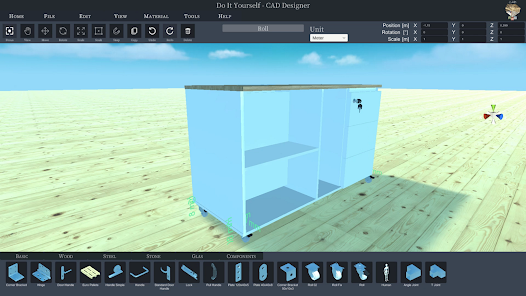
Do you have an idea, would you like to do some handicrafts yourself? You are planning a project in your own home, maybe you want to build your own table, a porch or a cupboard? But are you still looking for suitable software to plan your project and draw it beforehand, preferably in 3D?
Then DIY CAD Designer is just right for you! Download DIY CAD Designer today and implement your project in a playful way.
DIY CAD Designer has numerous libraries so you can easily drag and drop wooden beams, boards, sheets, rods and much more into your 3D scene to construct your project.
You can also use the importer to import models from other programs to use in your project. With DIY CAD Designer you can import the following formats:
- FBX
- OBJ
- GLTF2
- STL
- PLY
- 3MF
Numerous libraries make your work easier. DIY CAD Designer contains the following component libraries:
- Base
- Wood
- Metal
- Glass
- Stone
- Components
There are also numerous materials and colours that will help you to implement your planning realistically.
You can change components quickly and easily with the editing functions. Rotate, scale, position or copy your components. Choose between imperial [ft] or metric [m] system of measurement.
You can change your view at the push of a button, whether orthogonal or perspective, depending on the application. Fast viewing angles such as top view, front view or side view are also possible.
With the 3D dimensioning system, you can very quickly read all the information you want from your construction.
With the photo function, you can create and share high-resolution images of your project.
So what are you waiting for? Download DIY CAD Designer now and take full advantage!
I wish you lots of fun with DIY CAD Designer!!!
DIY CAD Designer classificação de uso
A classificação de uso é baseada no algoritmo da Similarweb que calcula as instalações atuais e os usuários ativos ao longo de um período de 28 dias.
Todas as categorias em
Estados Unidos--
Produtividade em
Estados Unidos#3,807
Principais concorrentes e aplicativos alternativos
Aplicativos com alta probabilidade de serem usados pelos mesmos usuários, da mesma loja.

Homestyler - Home Design Game

magicplan

ArcSite

Renovate AI : House Design
 DIY CAD Designer VS.
 fevereiro 26, 2026