

You’ve hit your search limit
Start your free trial to keep exploring full traffic and performance insights.
Get StartedWebsite Shortcut análises de aplicativos para 22 de fevereiro

Website Shortcut
- Deltac Development
- Google Play Store
- Gratuitos
- Personalização
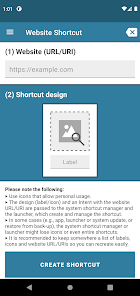
Personalize your Android homescreen by creating your own icon shortcuts for websites (URL/URIs). Customize your website shortcuts with your own selected text and image. Furthermore, there are no advertisements and it's free. I made it originally for myself, and decided to share. Giving a fair rating is very well appreciated!
From Android Oreo on (due to an API change, upon which this app is built), the bottom right tiny icon of the app the shortcut belongs to is added automatically by the launcher.
Features:
* Choose your own label and icon for the shortcut and the website URL/URI to open
* Icon selection via local file selection
* Works with most icon packs
* Supports usage of general URIs (e.g., mailto:example@example.com )
* Broad support for image formats: *.png, *.jpg, *.jpeg, *.ico, *.gif, *.bmp
* Automatic https scheme suggestion if it misses from the URL
* Make use of "Share via..." in any other application (e.g., a browser) to conveniently fill the website URL/URI field
* View the labels and website URL/URIs of currently present shortcuts of the app (navigate to the in-app drawer menu -> "Current shortcuts")
* Free
* No advertisements
--- Data policy
Creation of a shortcut is done by passing the shortcut design (label/icon) and an Intent with the website (URL/URI) to the system shortcut manager and the launcher. The system shortcut manager and the launcher create and manage the shortcuts, and maintain them with their associated Intents. In some cases (e.g., upon app, launcher or system update, or restore from back-up), the system shortcut manager or launcher might lose icons of existing shortcuts or even entire shortcuts. It is recommended to keep somewhere a list of labels, icons and website URL/URIs so you can recreate easily. In the app drawer menu, you can open the "Current shortcuts" which displays the labels and website URL/URIs of the still present shortcuts retrieved from the system shortcut manager.
In this version (≥ v3.0.0) a large randomly generated identifier is used to uniquely name shortcuts such that the launcher can uniquely identify shortcuts. In prior versions (≤ v2.1), a creation timestamp was used as unique identifier. Shortcuts created by prior versions (≤ v2.1) will still have their creation timestamp stored within their Intent and unique name.
Uninstalling the app (i.e. via Settings -> Apps -> Application List -> Website Shortcut -> Uninstall) will remove the app from the device, including its data. The Android uninstallation procedure will also notify the system shortcut manager and the launcher, which should remove from it all shortcuts associated with the app.
There are no advertisements in this app.
For information on data policy of previous versions: https://deltacdev.com/policies/policy-website-shortcut.txt
--- App permissions
This application does not require any app permissions.
For information on app permissions of previous versions: https://deltacdev.com/policies/policy-website-shortcut.txt
--- License
Copyright 2015-2022 Deltac Development
Licensed under the Apache License, Version 2.0 (the "License"); you may not use this file except in compliance with the License. You may obtain a copy of the License at
http://www.apache.org/licenses/LICENSE-2.0
Unless required by applicable law or agreed to in writing, software distributed under the License is distributed on an "AS IS" BASIS, WITHOUT WARRANTIES OR CONDITIONS OF ANY KIND, either express or implied. See the License for the specific language governing permissions and limitations under the License.
-----
The icons in the options and drawer menu are (based on) Material icons made by Google, which are licensed under the Apache License, Version 2.0.
See also: https://fonts.google.com/icons
Website Shortcut classificação de uso
A classificação de uso é baseada no algoritmo da Similarweb que calcula as instalações atuais e os usuários ativos ao longo de um período de 28 dias.
Todas as categorias em
Alemanha--
Personalização em
Alemanha#269
Interesses dos Usuários e Principais Categorias
Principais categorias e aplicativos usados pelos usuários do Website Shortcut
Principais Categorias
Afinidade
Principais Aplicativos Dentro da Categoria
38%



21%



9%




7%

Principais concorrentes e aplicativos alternativos
Aplicativos com alta probabilidade de serem usados pelos mesmos usuários, da mesma loja.

Bolt (Dev)

QmetaRam AI: Quantum Assistant
Google Automotive Keyboard
 Website Shortcut VS.
 fevereiro 22, 2026