

You’ve hit your search limit
Start your free trial to keep exploring full traffic and performance insights.
Get StartedReasily - EPUB Reader análises de aplicativos para 21 de fevereiro

Reasily - EPUB Reader
- jxlab
- Google Play Store
- Gratuitos
- Livros e referências
FAQ:
https://reasily.blogspot.com/search/label/FAQ
Help translation:
https://poeditor.com/join/project/ET9poeT6jm
Pro upgrade for:
⚫ Auto cloud backup and sync for notes and bookmarks.
⚫ More highlight styles: bold, strike-through, text color (now in free trial).
⚫ CSS customization.
Basic operation:
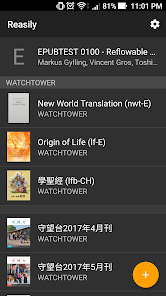
⚫ Click the "+" button at the bottom to add EPUB files into this app.
⚫ If you put your books in your own folders, you can add these folders in the drawer menu and files inside will be listed automatically.
⚫ Open multiple books simultaneously as if they are different apps. You can switch between opened books and the book list with the "recent apps" button of your device.
⚫ Swipe left/right to go to next/previous chapter or page.
⚫ Table of contents is in drawer menu.
⚫ Display options: sepia/night theme, custom font, margins and line-height adjustment, text justification, popup footnote position.
⚫ Scale text size with fingers (pinch-zoom gesture).
⚫ Click image to enlarge it and show its description. Scale image with fingers.
⚫ On Android 7 and above, you can read books in float windows or split views.
⚫ The current reading progress is saved automatically when the book is closed or moved to background.
⚫ A book can be closed by long-pressing the back button or the "Close" in the menu.
Bookmarks:
⚫ You can bookmark current chapter, selected text or clicked paragraph.
⚫ Bookmarks are listed above the table of contents in the drawer menu, so you can create your own table of contents with bookmarks.
⚫ Click "EDIT" to rename, reorder or remove bookmarks.
Annotation:
⚫ Long-click to select text.
⚫ Click color and styles to highlight selected text.
⚫ Long-click a style to set it as default.
⚫ Click the "Note"(chat bubble) button to write a note.
⚫ Click highlighted text again to show the note or edit the style of highlight.
⚫ Font size of pop-up note can also be scaled by pinch-zoom gesture.
⚫ Click "Notes" at the top of table of contents to show list of highlights and notes in book. You can choose which colors are showed with toggle buttons at the bottom.
Data synchronization:
⚫ "Sync now": Manually backup and sync highlights, notes and bookmarks to a hidden app folder in your Google Drive.
⚫ "Auto-sync data": Sync automatically. (Pro feature)
⚫ "Import from another EPUB": TRY to import annotation data from another EPUB file. Use this on a new version of a publication. May not success if the content is changed a lot.
Use downloaded fonts:
⚫ Supported font formats: TTF and OTF.
⚫ In Typeface → Folder, choose the folder containing fonts, all fonts in it will be listed in the Typeface menu, including those in subdirectories.
⚫ Fonts are listed by font families rather than file name.
⚫ If font files in the folder are changed, click ↻ to refresh the list.
⚫ To forcefully group fonts as a font family, put them in a subdirectory and add a '@' to the end of directory name. This is useful for Google Noto fonts.
Other features:
⚫ Supports ColorDict, BlueDict, GoldenDict, Fora dictionary, Google Translate, Microsoft Translator and all other apps who list themselves to the text selection menu.
⚫ Regular expression full-text search.
⚫ MathML support.
⚫ Media overlay support.
⚫ Able to send EPUB files to other apps.
⚫ Able to import EPUB files sent from another app.
⚫ Option to store imported files in SD card (Android 4.4+).
⚫ Add book shortcut to home screen.
⚫ Book categorization by adding labels.
⚫ Pin selected books to top.
⚫ Support right-to-left writings and vertical right-to-left layout books on Android 4.4 and above.
Due to work and time constraints, development of this app has been temporarily paused. There might be no further new features. However, don't worry — the note sync feature will continue to function, as it runs on the Google platform.
Contact me:
app.jxlab@gmail.com
Reasily - EPUB Reader classificação de uso
A classificação de uso é baseada no algoritmo da Similarweb que calcula as instalações atuais e os usuários ativos ao longo de um período de 28 dias.
Todas as categorias em
Estados Unidos--
Livros e referências em
Estados Unidos--
Interesses dos Usuários e Principais Categorias
Principais categorias e aplicativos usados pelos usuários do Reasily - EPUB Reader
Principais Categorias
Afinidade
Principais Aplicativos Dentro da Categoria
Mais aplicativos
11%

11%





9%





8%

Principais concorrentes e aplicativos alternativos
Aplicativos com alta probabilidade de serem usados pelos mesmos usuários, da mesma loja.

Readwise Reader

FBReader: Favorite Book Reader

eReader Prestigio: Book Reader

Bookshelf
Reasily - EPUB Reader VS. fevereiro 21, 2026