

You’ve hit your search limit
Start your free trial to keep exploring full traffic and performance insights.
Get StartedStroboscope Engineer análises de aplicativos para 21 de fevereiro

Stroboscope Engineer
- GyokovSolutions
- Google Play Store
- Gratuitos
- Ferramentas
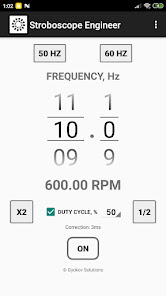
Stroboscope app and optical tachometer for measuring rotating, vibrating, oscillating or reciprocating objects. Optical tachometer can be used by starting it from MENU - TACHOMETER.
It is most commonly used for:
- adjusting speed of rotation - for example adjusting speed of rotation of turntable
- adjusting frequency of vibration
How to use:
1. Start app
2. Set frequency of strobe light (in Hz) using number pickers
3. Press ON/OFF button to start the strobe light
- use button [x2] to double the frequency
- use button [1/2] to halve the frequency
- use button [50 Hz] to set frequency to 50 Hz. This is for turntable speed adjustment.
- use button [60 Hz] to set frequency to 60 Hz. This is also for turntable adjustment.
- activate duty cycle by checking [DUTY CYCLE] check box and adjust duty cycle in percentage. Duty cycle is the percentage of time per cycle when the flash light is on.
- optionally you can calibrate the app by starting calibration from MENU - Calibrate. It is good to do calibration when frequency is changed. You can also set correction time manually in Settings.
Accuracy of the stroboscope depends on latency of your device flash light.
Optical tachometer can be used by starting it from MENU - TACHOMETER.
It analyzes moving objects and determines frequency in Hz and RPM.
How to use:
- point the camera to the object and press START
- hold steady for 5 seconds
- result is shown in Hz and RPM
You can save images captured during measurement by clicking on disk icon. At the end of measurement a message will be shown with information how many images were saved. Images are saved in folder Pictures/Stroboscope. The name of the images ends with information how many milliseconds they were taken relative to first picture. You can use this information to determine the object RPM by calculating time between similar images.
Minimum and maximum frequency can be set in SETTINGS - TACHOMETER. Increasing minimum frequency will reduce time needed for measurement. Maximum frequency is 30Hz (1800 RPM). Reducing maximum frequency will improve time needed for processing during measurement.
Stroboscope Engineer classificação de uso
A classificação de uso é baseada no algoritmo da Similarweb que calcula as instalações atuais e os usuários ativos ao longo de um período de 28 dias.
Todas as categorias em
Estados Unidos--
Ferramentas em
Estados Unidos--
Interesses dos Usuários e Principais Categorias
Principais categorias e aplicativos usados pelos usuários do Stroboscope Engineer
Principais Categorias
Afinidade
Principais Aplicativos Dentro da Categoria
Mais aplicativos
16%




14%

10%


8%


Principais concorrentes e aplicativos alternativos
Aplicativos com alta probabilidade de serem usados pelos mesmos usuários, da mesma loja.

BZ Auto

JAMMATES
Automile

Marine and Vessel Tracker
Stroboscope Engineer VS. fevereiro 21, 2026