

You’ve hit your search limit
Start your free trial to keep exploring full traffic and performance insights.
Get StartedAutoSheets análises de aplicativos para 22 de fevereiro

AutoSheets
- joaomgcd
- Google Play Store
- Gratuitos
- Produtividade
AutoSheets allows you to view/edit your Google Sheets data in/from Tasker!
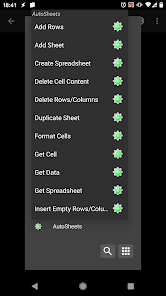
It currently supports the following actions:
- Add Rows: append rows of data to the end of a sheet or insert them somewhere in the middle of the sheet
- Add Sheet: add a new Sheet (tab) at the bottom of your spreadsheet
- Create Spreadsheet: create a whole new spreadsheet
- Delete Cell Content: clear the contents of cells without actually removing lines of columns from the sheet
- Delete Rows/Columns: actually remove rows and columns from sheets along with their content
- Duplicate Sheet: Create a new sheet inside a spreadsheet which is a copy of an existing sheet
- Format Cells: change the appearance of cells on your sheets like background or text color
- Get Cell: simple way to get the value of a single cell on your sheet based on its location or the value of a cell on a different column (great for Cloud Variables)
- Get Data: get multiple rows/columns of data at the same time. Optionally name the output data as multiple arrays for easier data parsing
- Get Spreadsheet: get info on a spreadsheet itself like its ID, sheet names, etc
- Insert Empty Rows/Columns: Simply insert new rows/columns with no content
- Update Cells: update the content of cells without inserting any new rows/columns
As an example you could use AutoSheets to add Cloud Variables to Tasker. Check here: https://forum.joaoapps.com/index.php?resources/cloud-variables.522/
Check out more AutoSheets examples here: https://forum.joaoapps.com/index.php?resources/categories/autosheets.38/
╭⋞⍟⍟⍟⍟⍟⍟⍟⍟⍟⍟⍟⍟⍟⍟⍟IMPORTANT NOTE⍟⍟⍟⍟⍟⍟⍟⍟⍟⍟⍟⍟⍟⍟⍟⋟
(WARNING: YOU MUST HAVE TASKER INSTALLED FOR THIS APP TO BE OF ANY USE: AutoSheets is only usable as a plugin in Tasker. Please don't rate it negatively because of this.)
Please contact me if anything is wrong and I'll respond to you promptly and try to fix it as soon as I can. Thank you.
╰⋞⍟⍟⍟⍟⍟⍟⍟⍟⍟⍟⍟⍟⍟⍟⍟⍟⍟⍟⍟⍟⍟⍟⍟⍟⍟⍟⍟⍟⍟⍟⍟⍟⍟⍟⍟⍟⍟⍟⍟⍟⍟⍟⍟⍟⍟⋟
AutoSheets classificação de uso
A classificação de uso é baseada no algoritmo da Similarweb que calcula as instalações atuais e os usuários ativos ao longo de um período de 28 dias.
Todas as categorias em
Estados Unidos--
Produtividade em
Estados Unidos--
Interesses dos Usuários e Principais Categorias
Principais categorias e aplicativos usados pelos usuários do AutoSheets
Principais Categorias
Afinidade
Principais Aplicativos Dentro da Categoria
Mais aplicativos
47%






13%




12%


7%





Principais concorrentes e aplicativos alternativos
Aplicativos com alta probabilidade de serem usados pelos mesmos usuários, da mesma loja.

ISO Today

XPENG

Hermit — Lite Apps Browser

TAP Kiln Control Mobile
AutoSheets VS. fevereiro 22, 2026