

You’ve hit your search limit
Start your free trial to keep exploring full traffic and performance insights.
Get StartedTouch Screen Test + análises de aplicativos para 25 de fevereiro

Touch Screen Test +
- Microsys Com Ltd.
- Google Play Store
- Gratuitos
- Ferramentas
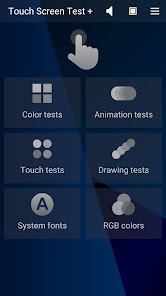
Touch Screen Test + is a professional app that is very useful when you want to quickly assess the quality of your smartphone screen and its graphic capabilities, or when you want to fix some dead pixels it may have. There are four big groups of procedures: COLOR, ANIMATION, TOUCH, and DRAWING tests; in addition, SYSTEM FONTS, RGB COLORS, Display information and Repair pixels complete the package of tests and make this free application a must-have software for most Android smartphones and tablets. You can easily find out which is the screen resolution, pixel density, aspect ratio, or current level of brightness; also, you can find out the frame rate for other 2D and 3D applications or if the gravity/acceleration sensors are working fine. Run all tests and you can rapidly decide, for example, if the eye comfort mode must be enabled to prevent eye strain, if the brightness level requires some adjustment or if the touch sensitivity is still good all over the screen's surface.
Once the application starts, the hand icon starts to fade in and out and you can select any group of tests by tapping the appropriate button. The Speaker button from the upper part of the screen enables/disables the text to speech (English must be set as the default language), while the one with a Screen icon allows two special pages to be displayed, Color bars and Color spectrum. The menu button offers easy access to Display info and Repair pixels pages, along with some other app-related commands.
Color tests shows five more buttons, one for each color test available: Purity, Gradients, Scales, Shades, and Gamma test. These tests allow you to simply verify the uniformity of the main colors on the screen, the contrast they offer at the current level of brightness, and see how many of their shades may be identified. The gamma test displays a suite of color shades that allows you to find out the gamma value (it indicates how well the brightness level of your device reflects the input signal).
Animation tests includes 2D and 3D animations, 2D and 3D gravity tests, and a page showing Moving bars of different colors. Execute these tests and you will find out the display FPS (frames per second) value for different 2D and 3D animations, as well as the working state of the inclination and gravity sensors (whose values are determining the motion of a ball on the screen).
The Touch tests group includes two Single-touch tests, two Multi-touch tests, and a page named Zoom and rotate. First tests allow you to verify the sensitivity of your touch screen and to identify the eventual less functional areas; they are complete when the whole screen is filled with blue rectangles - including the area occupied by the upper text message.
Drawing tests may be used to check if your touch screen is sensitive enough to allow you drawing continuous or dotted lines (which are persistent or are fading out in a few seconds) with your finger or your stylus. The fifth test is specially designed for styluses, checking if you can use one of them to touch some very small areas on the screen.
Repair pixels is the location of four special procedures that try to fix the dead pixels your touch screen might have: Moving lines, White / Strong noise, and Flashing colors.
WARNING!
- each of these procedures sets the screen brightness to maximum and contains flashing images, so we recommend you avoid looking at the screen directly while they are running
- as they intensively use the graphic controller, we recommend having the charger connected to your mobile device
- proceed with these procedures at your own risk! (each procedure must be active for at least 3 minutes for good results - touch the screen anywhere to exit)
Key features
-- comprehensive tests for touch screens
-- free application, non-intrusive ads
-- no permission required
-- portrait orientation
-- compatible with most tablets and smartphones
-- simple and intuitive interface
Touch Screen Test + classificação de uso
A classificação de uso é baseada no algoritmo da Similarweb que calcula as instalações atuais e os usuários ativos ao longo de um período de 28 dias.
Todas as categorias em
Brasil--
Ferramentas em
Brasil--
Principais concorrentes e aplicativos alternativos
Aplicativos com alta probabilidade de serem usados pelos mesmos usuários, da mesma loja.

Macrorify - Image Auto Clicker

Automate

TAP Kiln Control Mobile

DevCheck Device & System Info
 Touch Screen Test + VS.
 fevereiro 25, 2026