

You’ve hit your search limit
Start your free trial to keep exploring full traffic and performance insights.
Get StartedTutorLock Parental Control App análises de aplicativos para 23 de fevereiro

TutorLock Parental Control App
- TutorLock
- Google Play Store
- Gratuitos
- Educação
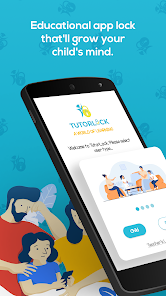
Parental Control App: Educational App Locker To Lock Apps As a parent or educator, are you concerned about the increasing screentime of children? In today's digital age, managing your child's screentime has become more crucial than ever. As parents and teachers, it's essential to find a balance between online and offscreen activities.
Introducing TutorLock, the perfect blend of parental control and education, It is an educational app locker designed to enhance the home school experience while managing the screen time limit. Lock apps on your child's device and have them answer quiz questions to unlock, ensuring a perfect mix of education and fun. By incorporating educational quiz questions, TutorLock transforms screentime into a productive and enjoyable learning experience.
How TutorLock Works
Struggling with balancing your child's screentime and offscreen learning? TutorLock is here to help. As a unique educational app locker, it offers categorized questions in multiple fields such as English, Math, Science, and Social Studies. The categories are further divided into subcategories, allowing you to target specific areas of improvement, like multiplication.
➕ Custom Questions for Personalized Learning Experience
TutorLock enables you to create a customized learning experience by adding your own questions, giving you full control over your child's educational progress.
The "Teacher's Lounge" feature in TutorLock allows teachers and parents to add custom questions and answers to the app. This flexibility enables targeted learning experiences, such as preparing for specific tests, and ensures that your child's home school journey is tailored to their unique needs.
🕒 Limit Screentime and Encourage Offscreen Activities
The locked apps can only be unlocked with correct answers, making it an ideal educational and kid security app for parents and teachers. Imagine setting a screen time limit by locking your child’s favorite games.
Promoting offscreen learning by motivating children to solve educational quiz questions. This innovative app locker approach strikes the perfect balance between screentime and offscreen learning, ensuring children engage with educational content while limiting their dependence on distracting apps.
🏫 Homeschooling Made Fun and Engaging
TutorLock's app locker makes homeschooling enjoyable and interactive. With TutorLock, you can limit screen time and focus on what matters most – your child's development. Say goodbye to app blockers and hello to a creative and fun learning experience with TutorLock.
🔒 Lock Apps and Encourage Offscreen Activities
Use TutorLock's parental control app for android to lock apps on your child's phone, creating guided access for children's devices. This way, you can limit screen time and promote offscreen activities, ensuring a healthy balance in your child's life.
✨ Key Features of TutorLock Parental Control App:
TutorLock combines parental control with kids' learning, allowing you to limit screen time while promoting education:
● Parental control to limit screen time combined with a kids' learning app
● Manage multiple kids' devices
● Add multiple kids
● Lock apps with trivia questions for children
● Craft custom questions to create personalized quizzes
● Set a screen time limit by determining the number of questions needed for an app to be unlocked
● Empower your offscreen parenting with this smart tool
TutorLock Parental Control App is a great alternative to Ourpact Jr., FamiSafe-Parental Control App, Google Family Link for Children, Cocospy, Child Safe Kit, Qustodio-parental control, Microsoft Family Safety, Minspy, Spyera, ParentsKit, Wispy, XNSpy, Bark for kids, Kidslox and Life-360.
Transform your child's screentime into a rewarding and educational experience with TutorLock.
Download today!
https://play.google.com/store/apps/details?id=com.mobile.funforfaq
TutorLock Parental Control App classificação de uso
A classificação de uso é baseada no algoritmo da Similarweb que calcula as instalações atuais e os usuários ativos ao longo de um período de 28 dias.
Todas as categorias em
Brasil--
Educação em
Brasil--
Interesses dos Usuários e Principais Categorias
Principais categorias e aplicativos usados pelos usuários do TutorLock Parental Control App
Principais Categorias
Afinidade
Principais Aplicativos Dentro da Categoria
Mais aplicativos
43%





19%


12%

12%


Principais concorrentes e aplicativos alternativos
Aplicativos com alta probabilidade de serem usados pelos mesmos usuários, da mesma loja.

 TutorLock Parental Control App VS.
 fevereiro 23, 2026