

You’ve hit your search limit
Start your free trial to keep exploring full traffic and performance insights.
Get StartedRemote control for Xiaom Mibox análises de aplicativos para 22 de abril

Remote control for Xiaom Mibox
- osApps
- Google Play Store
- Gratuitos
- Ferramentas
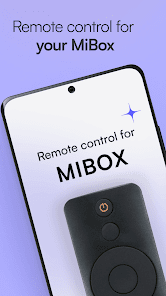
Control your Xiaomi Mi Box devices with a convenient remote controller!
Xiaomi MiBox remote control is an innovative app that lets you control all Xiaomi Mi Box devices with your fingertips. Choose the required remote control and build a smooth connection to navigate the options. This app turns your smartphone into a handy remote control for Xiaomi Mibox.
There is a variety of remote controls that are compatible with specific Xiaomi devices. Every controller has feature-based options such as changing channels, sources, and videos. Peek at the additional options that improve your user experience and make it worth using Xiaomi Mi Box remote control app.
Xiaomi Mi Box is a set-top box that helps you stream your favorite movies, shows and much more. And this Android remote control app doubles the fun of your steaming with handy functionality. Fire your imagination and experience a different pace of technology.
Use Xiaomi Mi Box remote control easily to experience infinite entertainment!
How To Use?
Have a glance at the options and choose a compatible one
Turn on your Mi Box and connect it to a WIFI network
Connect your phone with same WIFI to build a connection
Change volume, channels and more to your choice
Swap the theme mode (night or dark) for ease of use
Note: Xiaomi Mi TV Box remote works with an Android phone that has an IR sensor. If the user chooses to connect without WiFi, he will be directed forward without a WiFi connection.
== Mi Box Remote Control
Xiaomi Mibox TV remote control app is intended to control all Mi Box devices with built-in remote control options. Connect your phone and TV box. After a successful connection, the user will be navigated to the screen of his liking.
== Xiaomi Device Controller
Our Xiaomi TV controller app provides custom remote control options for all Mi Box devices. Xiaomi has its own streamer with the name Mi Box. This device has multiple models, such as Mi Box S, Mi Box 3, Mi Box 4K and more.
== Easy Functionality
Simply like a physical media player remote control, Xiaomi TV remote app provides a set of buttons to perform different operations. Every Mi Box device controller has widgets to change TV sources, channels, volume and send text.
== Different Screen Options
You can try to explore these screen options to control your Xiaomi Mi Android TV Box device.
1) Touchpad Screen: This screen allows users to use their favorite widgets from the top side of phone screen, or they can navigate through the touchpad.
2) Remote Control Screen: It turns the whole screen into a remote control so you can use its button like the real one.
3) Media screen: This screen makes media navigation super easy for users.
4) Apps screen: This screen helps you to look at all apps installed on the MiBox. You can open your saved apps from here.
Apart from these screens, there is also a contact screen and a settings screen that provide extra help for users. The settings screen lets you customize the props to cherish your experience.
Xiaomi Mi Box Remote Control Features:
Smooth, interactive, and user-centric interface
Selection screen to select the required remote
Manual screen to connect to the device manually
Discovery screen shows devices on same network
Light, dark and automatic appearance options
Option to auto-connect to last connected device
Free remote control for Xiaomi Mi Box setup
PREMIUM PERKS:
Get an exclusive subscription to become a Gold Member and permanently eliminate annoying ads with a one-time payment. Lightning-fast speed connections and much more will be there to experience.
Disclaimer:
This is not an official Xiaomi Mi Box app. But it works efficiently to control all Xiaomi Mi TV Box devices.
🎮🕹👨💻🙂📲🐱🏍🖥
Remote control for Xiaom Mibox classificação de uso
A classificação de uso é baseada no algoritmo da Similarweb que calcula as instalações atuais e os usuários ativos ao longo de um período de 28 dias.
Todas as categorias em
Alemanha--
Ferramentas em
Alemanha--
Principais concorrentes e aplicativos alternativos
Aplicativos com alta probabilidade de serem usados pelos mesmos usuários, da mesma loja.

Harvest Right
Remote Mouse
SOLARMAN Smart

Amazon Fire TV
 Remote control for Xiaom Mibox VS.
 abril 22, 2026