

You’ve hit your search limit
Start your free trial to keep exploring full traffic and performance insights.
Get StartedTTSReader Pro - Text To Speech análises de aplicativos para 24 de março

TTSReader Pro - Text To Speech
- WellSource - Empowering You
- Google Play Store
- Gratuitos
- Produtividade
Reads any text, pdf, websites. Surprise your friends with funny voice-messages.
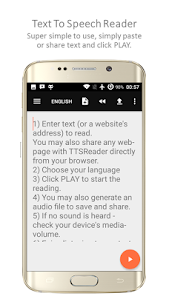
Text To Speech (TTS) Reader for any text (write your own or text file), website and PDF files.
Listen to articles, or play-back your own texts.
Send your friends audio messages in different voices and accents! Write in English, let it be read by one of the many voices and languages. Spanish for example will result in your text being read with a Spanish accent. Send the generated voice message to friends via messaging, Whatsapp, or any other social media. See how they react ;) It's a lot of fun!
Pinch-zoom to enlarge font.
Keeps reading in the background- so you can do other things with the phone, or even turn off the screen to save battery.
Export to mp3 audio files!! (as much as 800 words)
Remembers the article and last position when paused, even if you exit the app. This way, you can come back to listening right where you previously left.
Premium includes: dark mode, font types.
And much more...
Convert any PDF file to plain text and speech
Large variety of natural sounding voices.
Ideal for listening to articles while driving, traveling, exercising, working and more.
Share websites with TTSReader directly from your browser, to read them out loud,
Once you have the language downloaded (most devices have their default language downloaded by default) - and you have your text, TTSReader works completely offline.
You save tons of data roaming charges, and you can listen to text even without reception.
Auto-scrolls to show current text on screen.
Share audio files
Reads text with different accents - try it out - it's really funny.
Control speech rate.
And much more.
If it doesn't work - first of all check your media-volume level. It's probably on mute (use your device's buttons).
Second - make sure you have the necessary voice/language downloaded, as we use your devices languages & voices.
If it doesn't recognize a website it might be because it redirects to a different address. Try to use the "http://" prefix (or "https://") in the website address if you haven't. Use full website address. If that doesn't work, simply paste the text from the website.
While working, or driving, listen to interesting articles and books
TTSReader is really helpful for busy people who want to be able to listen to written content while doing something else.
For instance - you can listen to whole Wikipedia articles (just copy-paste them to here, or share directly from the browser), or to some documents you need to study for work or personal education.
Saves you tons of mobile data traffic and charges
Regular podcast apps consume a ton of data, as long audio files are also large in size. Contrary to that, TTSReader uses text to speech engines, which are built in your mobile system.
Educational for Kids
TTSReader can now read your kids additional stories on top of those that mommy & daddy read them. Try it, our feedback is that kids love it!
Aid for people with difficulties in reading
People with difficulties in reading (regular or temporal), but don't want to compromise self-developing utilize TTSReader as their helper.
Narrating & dubbing movies, presentations & more
Simply type the text you need narrated in the required language (you can translate it first via Google-Translate) - click the Export button - to record the output speech to an audio file.
You've just created your professional - sounding audio file in any language.
Privacy: We at TTSReader.com value your privacy, and that's why we do not store anything you type or in fact any other data about you.
*Background smartphone image, edited based on image by GadgetsGuy and GalaxyOptimus collage. - Derivative work from [1], [2], and [3], CC BY-SA 3.0, https://commons.wikimedia.org/w/index.php?curid=47968311
For additional info & feedback, please contact us at admin@speechlogger.com,
For TTSReader for PCs, iOS (on Safari), desktops, laptops, go to http://ttsreader.com
Enjoy listening!
TTSReader Pro - Text To Speech classificação de uso
A classificação de uso é baseada no algoritmo da Similarweb que calcula as instalações atuais e os usuários ativos ao longo de um período de 28 dias.
Todas as categorias em
Estados Unidos--
Produtividade em
Estados Unidos#2,598
Interesses dos Usuários e Principais Categorias
Principais categorias e aplicativos usados pelos usuários do TTSReader Pro - Text To Speech
Principais Categorias
Afinidade
Principais Aplicativos Dentro da Categoria
35%


21%




18%





10%

Principais concorrentes e aplicativos alternativos
Aplicativos com alta probabilidade de serem usados pelos mesmos usuários, da mesma loja.

Asthma Diary

Listening: Text to Speech
Speech Assistant AAC

Funny Voice Reverse Singing
 TTSReader Pro - Text To Speech VS.
 março 24, 2026