

You’ve hit your search limit
Start your free trial to keep exploring full traffic and performance insights.
Get StartedKinScreen: Screen Control análises de aplicativos para 29 de março
KinScreen: Screen Control
- TEQTIC Apps LLC
- Google Play Store
- Gratuitos
- Ferramentas
Do you find yourself poking your screen to keep it from turning off? Want to turn your screen on without the power button? KinScreen automatically keeps your screen on while you're using your phone, but turns it off more quickly when you aren't to save battery power.
Please check www.dontkillmyapp.com to make sure KinScreen is able to run in the background!
Brief Overview
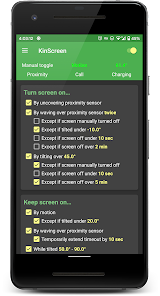
• Turn screen on
- with a wave
- by tilting up
• Turn screen off
- by covering screen (pocket, face down)
- by tilting down
• Keep screen on
- while holding phone (motion or tilt)
- by waving over screen
- while using specific apps
- while on a call
- while charging
- manually via widget, QuickSettings, or notification toggle
• Set a separate timeout for the lock screen
• Set a maximum time to keep the screen on
• Works in the dark unlike Samsung's Smart Stay
• No ads
Originally released in 2014, KinScreen is continually being improved based on user feedback and feature requests.
Install now and forget about keeping your screen on! Once you understand its capabilities, you will immediately notice it missing on a new device!
Customer service is a top priority at TEQTIC. If you experience an issue, please use the "Contact support" menu option inside the app or email kinscreen@teqtic.com before leaving a negative review! We usually reply to all emails within 48 hours, and often much quicker.
Detailed Overview
Turn screen on with gestures
Save the wear and tear on your power button by using gestures to turn the screen on. You can turn the screen on via the proximity sensor or by lifting the device up. Uncovering the proximity sensor lets you pull your phone out of your pocket and have the screen turn on automatically. Waving over the sensor works great when your hands are dirty! You may also set a tilt angle that turns the screen on when the phone is lifted up (tilt to wake).
Keep screen on automatically
Choose from various methods that detect use of the device and keep the display on. The motion method detects small movements from you just holding the device. Waving over the proximity sensor is another way to keep your screen on, and optionally extends the timeout. The tilt angle method allows the display to stay on when propped up, even when you aren't holding it. You can also choose to have the display stay on while using chosen apps, while charging, or while on a call (display still turns off when you put the phone to your ear).
Time screen out quickly to save battery
You can choose the screen timeout when there are no keep-on functions actively keeping the screen on. If the screen isn't being kept on, it should time out quickly to save battery power. The screen can turn off even quicker when the proximity sensor is covered (in-pocket or face down), or when the device is pointed down. You can also set a separate timeout for the lock screen. KinScreen will not turn the screen off when other apps are keeping the screen on, unless you have selected to actively turn the screen off.
Resource Use
KinScreen is designed to be as efficient and battery friendly as possible. It uses minimal CPU and memory, and sensor use is highly optimized. Some functions use more power than others. Turn-on-by-tilt-angle will use significant battery power because it needs to keep the device awake in order to work.
Premium Version
All functions are highly customizable to your taste. Fine-tuning of numerical parameters is locked in the free version. Please upgrade to premium to fully unlock all customization, and support future development!
Sensitive Permissions
The Accessibility Service permission is optional and only used to actively turn the screen off. Information provided by the Accessibility Service is not collected or shared in any way.
KinScreen: Screen Control classificação de uso
A classificação de uso é baseada no algoritmo da Similarweb que calcula as instalações atuais e os usuários ativos ao longo de um período de 28 dias.
Todas as categorias em
Estados Unidos--
Ferramentas em
Estados Unidos#4,600
Interesses dos Usuários e Principais Categorias
Principais categorias e aplicativos usados pelos usuários do KinScreen: Screen Control
Principais Categorias
Afinidade
Principais Aplicativos Dentro da Categoria
Mais aplicativos
18%




16%





12%




8%





Principais concorrentes e aplicativos alternativos
Aplicativos com alta probabilidade de serem usados pelos mesmos usuários, da mesma loja.
Automatic Scroll

ADW Launcher 2

HappyLighting

One Hand Operation +
KinScreen: Screen Control VS. março 29, 2026