

You’ve hit your search limit
Start your free trial to keep exploring full traffic and performance insights.
Get StartedCELEST1771 Smart Analog Watch análises de aplicativos para 3 de maio

CELEST1771 Smart Analog Watch
- CELEST Watches
- Google Play Store
- Pagos
- Personalização
THE COMPASS IS ONLY DECORATIVE!!!
With a CELEST Watches watch face, you can show off your unique style and taste.
INSTALLATION GUIDE ↴
When attempting to install a watch face from the official Google Play Android app, you may encounter several issues.
In cases where the watch face is installed on your phone but not on your watch, the developer has included a companion app to enhance visibility on the Play Store. You can uninstall the companion app from your phone and look for a triangular symbol next to the Install button in the Play Store app (https://i.imgur.com/OqWHNYf.png). This symbol indicates a dropdown menu, where you can pick your watch as the target for installation.
Alternatively you can try to open the Play Store in a web browser on your laptop, Mac or PC. This will enable you to visually select the correct device for installation (https://i.imgur.com/Rq6NGAC.png).
[Samsung] If you followed the aforementioned instructions and the watch face still doesn't appear on your watch, open the Galaxy Wearable app. Navigate to the Downloaded section within the app, and you'll find the watch face there (https://i.imgur.com/mmNusLy.png). Simply click on it to initiate the installation.
WATCH FACE DETAILS ↴
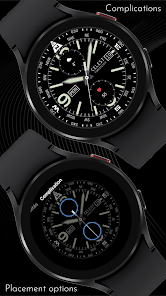
Please note that the compass is purely cosmetic, it does not work!
Customization:
- 9 background color variations
- 2 circular complication placement options
- 4 options to dim the AOD screen if you find it too bright: 0%, 25%, 50%, 75%
Please note that during customization, you can set a background image for your custom top and bottom circular complications to hide the default power and steps dials.
CATALOG & DISCOUNTS↴
Our online catalog: https://celest-watches.com/product-category/compatibility/wear-os/
Wear OS discounts: https://celest-watches.com/product-category/availability/on-sale-on-google-play/
FOLLOW US ↴
Instagram: https://www.instagram.com/celestwatches/
Facebook: https://www.facebook.com/celeswatchfaces
Twitter: https://twitter.com/CelestWatches
Telegram: https://t.me/celestwatcheswearos
CELEST1771 Smart Analog Watch classificação de uso
A classificação de uso é baseada no algoritmo da Similarweb que calcula as instalações atuais e os usuários ativos ao longo de um período de 28 dias.
Todas as categorias em
Estados Unidos--
Personalização em
Estados Unidos--
Principais concorrentes e aplicativos alternativos
Aplicativos com alta probabilidade de serem usados pelos mesmos usuários, da mesma loja.

CELEST5462 Analog Watch

CELEST5460 Analog Watch

CELEST1800 Military Watch

CELEST5418 Military Watch
 CELEST1771 Smart Analog Watch VS.
 maio 3, 2026