

You’ve hit your search limit
Start your free trial to keep exploring full traffic and performance insights.
Get StartedField Recorder análises de aplicativos para 5 de março

Field Recorder
- Pfitzinger Voice Design
- Google Play Store
- Pagos
- Música e áudio
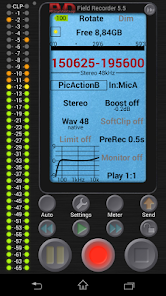
Our app Field Recorder makes your phone a perfect alternative for an additional recording device: lightweight and always with you
With extensive features like a recording equalizer and limiter, it's the best choice for anyone who wants high-quality audio recordings with built-in microphones, external microphones, or USB sound cards
The audio parameters can be adjusted in more ways than with any other audio recorder. And they can be saved as presets and switched between in a flash
Immediately after recording, you can e.g. send a concert recording to friends, upload a podcast to the web, or an interview to a radio station, or archive a meeting…
Use the full potential of your microphones: Record band rehearsals, voice notes, lectures, dictation, monitoring, eavesdropping, phone calls, sound recordings, ambience, snoring, animal sounds, audio logs…
Functions
Field Recorder also has pre-defined presets for typical tasks like dictation, listening, concerts, phone calls… and can save your own presets.
⚫ Uses internal or external microphones or USB sound cards
⚫ Record, overwrite, resume, play, and share WAV files in efficient mono/16kHz/16-bit format up to professional stereo/192kHz/24-bit
⚫ Convert recordings to MP3, AAC, or FLAC using helper apps
⚫ Don't miss anything important: Up to 90 seconds before and 4 seconds after the recording can be automatically added
⚫ Auto-start, stop, and resume controlled by volume. The control signal can be filtered differently to prevent false starts
⚫ Send an email if your selected noise level is exceeded
⚫ Automatically stop at 4GB file size or start new files without gaps
⚫ Corrects microphone or situational recording weaknesses during recording with low-cut filters, parametric and shelving equalizers, and stereo balance correction
⚫ Recording amplifier, configurable limiter, soft clipping, noise shaping, and dithering
⚫ Displays spectrum, signal, or sonogram during recording
⚫ HD monitoring with latency down to 20ms
⚫ WAV player with adjustable volume maximization, mute and audible fast-forward/rewind at two speeds, random access to any position during playback by tapping the transport bar, and loop play
⚫ GUI configurable: color, left-handed layout, round or rectangular LEDs, button size…
Within the first 2 hours
Full money refund is available upon request. Test whether the recording is working properly. Audio files do not need to be created: Simply press the pause button to switch to record standby mode, and a potential file name will appear. The date and time, level meter, and monitor settings will work. If you activate "Monitor", headphones prevent feedback.
Test presets that you select by tapping "Factory". You might find a preset in our cloud that's a good fit for your device. Then test the input configurations from "In:MicA" to "In:Raw".
Tips
⚫ The name of a preset turns gray when it is modified
⚫ During playback, quiet recordings can be amplified with e.g. "Play +40dB", never too loud thanks to the playback limiter
⚫ Tap the "Time/Position/Free" field: shows the remaining recording time
⚫ Tap the battery symbol: toggles between battery and CPU usage
⚫ Tap "Dim": the screen always stays on
⚫ Tap "CLP": clears the clip LEDs
⚫ Tap the level meter: opens its settings
⚫ The levels can show either peak values or the control signal for autostart/auto-email
⚫ Active auto start overrules pressing the pause button
⚫ Autostart via specific manual pausing of recording
⚫ The autostart control signal is optimized for speech with a 1.5kHz filter. 750Hz better suppresses high-frequency interference, 3kHz low-frequency interference
⚫ Limiter and soft clipping only work when boost is above 0dB
⚫ Soft clipping begins above -3dBFS
⚫ Overwriting and appending modify existing files (warning can be disabled)
⚫ Saving as a 24-bit recording with Android 12+
⚫ Homescreen widget
⚫ Custom FTP upload
⚫ File overview with volume curves and play
Ranking da Loja
A Store Rank é baseado em vários parâmetros definidos pelo Google e Apple.
Todas as categorias em
Alemanha--
Música e áudio em
Alemanha#21
Interesses dos Usuários e Principais Categorias
Principais categorias e aplicativos usados pelos usuários do Field Recorder
Principais Categorias
Afinidade
Principais Aplicativos Dentro da Categoria
27%



16%



11%

11%


Principais concorrentes e aplicativos alternativos
Aplicativos com alta probabilidade de serem usados pelos mesmos usuários, da mesma loja.
n-Track Studio Pro | DAW

Recorder AI:Voice&Meeting Note

Music Equalizer - Bass Booster

Jamzone - Sing & Play Along
 Field Recorder VS.
 março 5, 2026