

You’ve hit your search limit
Start your free trial to keep exploring full traffic and performance insights.
Get StartedPingTools Pro análises de aplicativos para 15 de abril

PingTools Pro
- Yaroslav Syrytsia
- Google Play Store
- Pagos
- Ferramentas
This app contains the following tools:
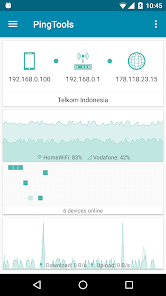
• Info tool, where you can see the network connection status, IP address of the Wi-Fi router, external IP address, information about your ISP and more. In addition, Info screen displays a couple useful charts of Wi-Fi connection and network usage.
• Watcher – checks the network resources on schedule. Watcher show notify if the state of the resource has changed, it will allow you to always be aware of any problems with the network.
• Local-Area Network – looking for other network devices. You will always be aware of who is connected to your network as well as identify hardware manufacturer and what services are running on these devices.
• Ping - a tool needs no description. You can use a standard set of parameters, as well as additional features such as TCP and HTTPHTTPS ping. Background work and sound notifications will enable you to monitor the state of the remote host without being distracted.
• GeoPing - check the availability of the resource throughout the world. In just one click you can find out if your site is accessible for ex in Singapore.
• Traceroute - an indispensable tool for system administrators. Shows the route on which the packets are from your device to the target host. The Visual Traceroute uses map to show you how the data packages goes around the earth to reach a specified destination.
• iPerf - Utility for analyzing network bandwidth. It is based on iperf3 and supports both server and client mode.
• Port scanner - a powerful multi-threaded TCP ports scanner. With this tool you can get a list of open ports on a remote device. Most of ports displayed with description, so you will know what application uses it.
• Whois - a utility that displays information about the domain or IP address. With the help of Whois you can find out the date of registration of the domain information about the organization, contact information, and more.
• UPnP scanner - shows UPnP devices on your local network. With UPnP scanner you can find out the IP address of your router, game console like Xbox or PlayStation, media servers and other devices. DLNA-compatible TVs and media boxes (Samsung AllShare, LG SmartShare) also supported.
• Bonjour browser - is a network utility for exploring Bonjour (ZeroConf, Avahi) services on the network. Bonjour comes built-in with Apple's operating systems, so you can use this utility to search the network address of an iPhoneiPod etc.
• Wi-Fi scanner - list of access points around you. In addition, you can find out the manufacturer of the AP, the signal level and a lot of other information. You can use the chart to appreciate it all visually. Supports both 2.4 GHz and 5 GHz devices.
• Subnet scanner - this tool can scan your Wi-Fi subnet to find other hosts around. Scanner can check host via Ping, or check multiple TCP ports. So u can simply find services in your subnet (for ex scan 22 port to find where is SSH running). You can also configure IP address range for custom scan.
• DNS Lookup - tool for querying Domain Name System (DNS) name servers. Is useful for network troubleshooting or just find out the IP address of the domain, mail server and more. Reverse DNS is supported as well.
• Wake on LAN - is a tool that allows you to turn on a network computer remotely by sending a special data packet (called a Magic Packet). WoL is simply irreplaceable in cases when you do not have physical access to the computer, which is suddenly turned off.
• IP Calculator - this utility is useful when setting up network equipment. IP Calculator will help you to calculate the parameters of the network, determine the range of IP addresses, subnet mask.
PingTools Pro has been awarded the “App of The Day” by MyAppFree (https://app.myappfree.com/)
PingTools Pro classificação de uso
A classificação de uso é baseada no algoritmo da Similarweb que calcula as instalações atuais e os usuários ativos ao longo de um período de 28 dias.
Todas as categorias em
Alemanha--
Ferramentas em
Alemanha--
Interesses dos Usuários e Principais Categorias
Principais categorias e aplicativos usados pelos usuários do PingTools Pro
Principais Categorias
Afinidade
Principais Aplicativos Dentro da Categoria
Mais aplicativos
27%






20%


19%


8%


Principais concorrentes e aplicativos alternativos
Aplicativos com alta probabilidade de serem usados pelos mesmos usuários, da mesma loja.

Control+

Ruijie Reyee

ABAX Admin

YI Life
PingTools Pro VS. abril 15, 2026