

You’ve hit your search limit
Start your free trial to keep exploring full traffic and performance insights.
Get StartedPDFelement: PDF Editor, Viewer аналитика приложений для 27 апреля

PDFelement: PDF Editor, Viewer
- Wondershare Technology Hunan Co.,Ltd.
- Apple App Store
- Бесплатный
- Продуктивность
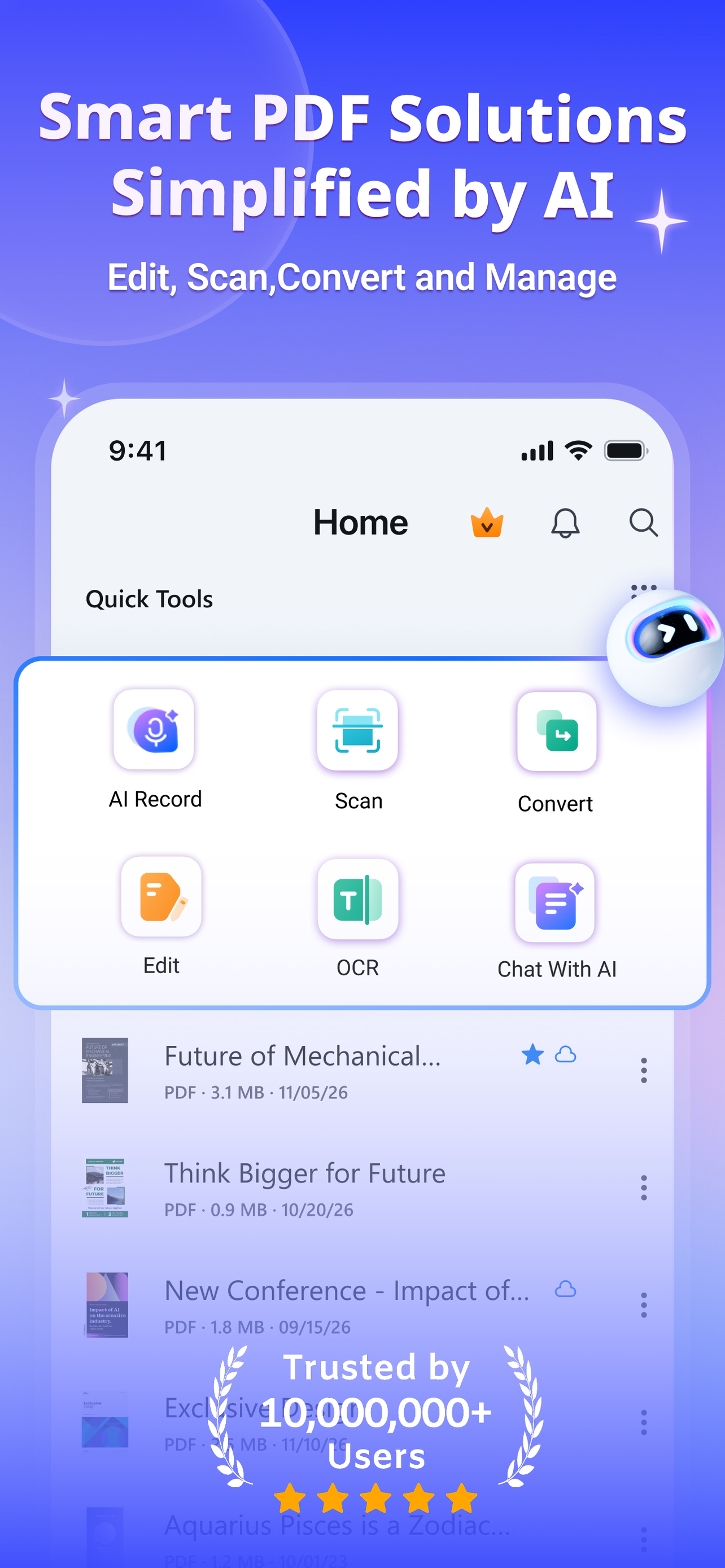
PDFelement 6.1.0 Major Update: All-New Scan Upgrade
Scan upgraded with optimized core algorithms & UI. New modes for ID,books,invoices,text extraction,whiteboards.Streamlined one-tap workflows,clearer,faster,more efficient scanning.
Tax Season is Here!
March to June – peak tax season.If you're overwhelmed by receipts,statements,forms,PDFelement is the AI-powered solution that brings order to chaos.Turn paper piles into organized digital files in minutes.
Your Tax Season MVP
• Hundreds of paper receipts
Scan + OCR: Scan receipts with your phone. OCR extracts text, making them searchable and editable
• Bank statements in PDF
PDF to Excel Converter: Convert statements to Excel with one click. Data recognized instantly for analysis
• • Scattered tax forms
Merge PDF: Combine forms, proofs, and declarations into one file
Finding tax clauses
Chat with PDF: Ask "What's the tax rate?" – AI finds the answer instantly
• Foreign language invoices
AI Translate: Process documents with translation in 60+ languages
• Errors in reports
Edit PDF: Correct mistakes directly on PDFs without reprinting
• Large files to email
Compress PDF: Reduce size while maintaining quality
• Confidential documents
Password Protect: Keep sensitive data secure with encryption
One app. Everything PDF. For work, study, and life.
AI PDF
• Chat with PDF: Ask questions and get instant, accurate answers directly from your documents
• AI Summarize PDF: Condense lengthy contracts and reports into key points in seconds
• AI Translate: Translate any selected text with seamless switching between 60+languages
• Generate Mind Ma: Visually organize ideas and concepts from any PDF content
• AI Record: Record and transcribe voice notes to text for efficient annotation
Edit PDF Like Word
• PDF Editing: Edit text and images directly for ultimate convenience
• Font: Edit with the same font and erase easily, quickly navigate & adjust the font size or spacing
Professional PDF Reader
• Liquid Mode: PDFs adjust perfectly to your screen
• Bookmark: Navigate intuitively with Bookmarks
• Read Aloud: Listen with preferred voice and speed
Scan and OCR
• Scanner: Digitize receipts, invoices, and certificates
• OCR: Extract text from images or PDFs for editing
• Scan Multiple Pages: Create single documents from multiple scans
PDF Converter
• PDF to Office & Image: Convert to Word, Excel, PPT, JPG, PNG, and more
• Convert to PDF: Create PDFs from Microsoft Office files and images
Annotate PDF
• Annotate: Add notes, shapes, arrows, and sticky notes
• Text Markup: Highlight key information
• Comment: Make comments stand out with popular styles
• Measure: Calculate distance, perimeter, and area
Create PDF
• Create Blank PDF: Choose from various paper templates
• Create from Images: Import from Photos or scan with camera
Manage PDF
• Compress: Reduce PDF size without quality loss
• Merge PDF: Combine multiple files into one PDF
• Organize Pages: Add, delete, rotate, split, and rearrange pages
Fill and Sign
• Fill Forms: Complete PDF forms with interactive fields
• Digitally Sign: Add text or handwritten signature images
• Custom Stamp: Stamp with images, drawings, or text
Store & Share PDF
• Save to Cloud: Access files anywhere with PDFelement Cloud
• Protect PDF: Set passwords for sensitive content
• Share PDF: Share via social media, link, or email
PDF Templates
• Rich Library: Access resumes, invoices, and invitation templates
• Easy Customization: Adjust colors, fonts, and layouts
• Professional Designs: Polished templates for business and education
MEMBERSHIP SUBSCRIPTION DETAILS:
Payment will be charged to your iTunes account upon confirmation of purchase.
Subscriptions automatically renew unless auto-renew is turned off at least 24 hours before the current period ends. Manage your subscriptions for a seamless experience.
Terms of Use: https://www.wondershare.com/company/terms_conditions.html
Privacy Policy: https://www.wondershare.com/privacy.html
Рейтинг магазина
Ранг магазина определяется на основе нескольких параметров, установленных Google и Apple.
Все категории в
Соединенные Штаты--
Продуктивность в
Соединенные Штаты--
Лучшие конкуренты & Альтернативные приложения
Приложения с высокой вероятностью будут использоваться одними и теми же пользователями, из одного и того же магазина.

Foxit PDF Editor

UPDF - AI-Powered PDF Editor
PDF Pro - Reader Editor Forms

PDF Expert: Editor & Converter
 PDFelement: PDF Editor, Viewer VS.
 апрель 27, 2026