

Epson Setting Assistant аналитика приложений для 22 апреля

Epson Setting Assistant
- Seiko Epson Corporation
- Google Play Store
- Бесплатный
- Продуктивность
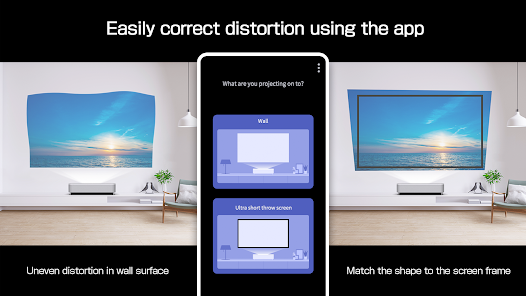
Epson Setting Assistant is an app that automatically corrects the shape of a projected image by using your camera.
By taking a shot of the projected pattern, the app automatically corrects distortion in the projected image and adjusts its shape to match the screen.
[Main Features]
1) Shape correction
The app adjusts the image to a rectangular shape or aligns it with a frame, such as a projector screen.
2) Unevenness correction
The app detects small surface irregularities, such as on a wall, and corrects distortion in the projected image.
[For Home Projector (EH Series) Users: Using the App]
Make sure your Android device and the projector are connected to the same network.
1. Select [Installation] ([Installation] > [Geometry Correction Wizard]) from the projector's menu.
2. Open this app on your Android device and select [Home] as the projector type to automatically connect to the projector.
3. Follow the on-screen instructions to take a shot of the projected pattern using the camera in the app, and the corrections will be completed automatically.
[For Business Projector (EB Series) Users: Using the App]
Make sure the [Wireless LAN Power] setting is set to [On] in the projector‘s [Management] menu.
1. Select [Installation] > [Connect to Setting Assistant] from the projector's menu to project a QR code.
2. Open this app on your Android device, select [Business] as the projector's type, and then scan the QR code to automatically connect to the projector.
3. Follow the on-screen instructions to take a shot of the projected pattern using the camera in the app, and the corrections will be completed automatically.
[Supported Projectors]
Visit https://support.epson.net/projector_appinfo/setting_assistant/en/ for details.
Depending on your projector model, some features may not be available.
[Notes for use]
Depending on your environment, such as a curved projection surface or wallpaper with rough textures or patterns, automatic correction using the app may not be available. In these situations, please correct the image shape from the projector's menu.
Depending on your smartphone/tablet, the Wi-Fi settings may prevent you from temporarily connecting to the projector. Turn your Wi-Fi off and then on again and try again.
For detailed important points, visit https://download2.ebz.epson.net/sec_pubs_visual/apps/setting_assistant/210/EN/index.html.
You can also check these from the [Online support guide] in the menu at the top right of the app.
Images used here are for illustrative purposes only. The actual images may differ.
We welcome any feedback you have that could help us to improve this app. You can contact us through "Developer contact". Please note that we cannot reply to individual inquiries. For inquiries regarding personal information, please contact your regional branch described in the Privacy Statement.
[App Permissions]
To use the app, the following permissions are required.
[Required] Camera
For capturing correction patterns or QR codes for connection.
Рейтинг использования Epson Setting Assistant
Рейтинг использования основан на алгоритме Similarweb, который подсчитывает текущие установки и активных пользователей за 28-дневный период.
Все категории в
Германия--
Продуктивность в
Германия--
Интересы пользователей & Топ-категории
Лучшие категории и приложения, используемые пользователями Epson Setting Assistant
Топ категории
Близость
Top apps within the category
Другие приложения
27%






21%


14%


13%



Лучшие конкуренты & Альтернативные приложения
Приложения с высокой вероятностью будут использоваться одними и теми же пользователями, из одного и того же магазина.

Antique Identifier - AntiqAI

All Data Transfer: Phone Clone

Data Transfer & File Sharing

InstaVision: Smart & Safe Home
Epson Setting Assistant VS. апрель 22, 2026