

You’ve hit your search limit
Start your free trial to keep exploring full traffic and performance insights.
Get StartedStorage Analyzer & Disk Usage аналитика приложений для 29 апреля

Storage Analyzer & Disk Usage
- Mobile Infographics Tools
- Google Play Store
- Бесплатный
- Продуктивность
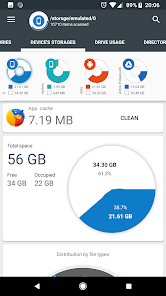
Storage Analyzer & Disk Usage displays information on sdcard, usb devices, external and internal storage in a simple and clear graphical form (infographics).
Accessing device storage and USB drives
Application reads from the device storage list of files and file-specific data (name, path, size, last modified date, file preview) in order to build device statistics and display it in a form of report and file usage diagram (pie chart, sunburst chart).
Accessing cloud drives
Application allows users to connect cloud drives (Google Drive, Dropbox, Yandex.Disk). When the appropriate drive is connected Application reads a list of files and file-specific data (name, path, size, last modified date, file preview) in order to build cloud drive statistics and display it in a form of report and file usage diagram.
Accessing device Installed applications
Application reads a list of installed applications and application-specific data (package name, app icon, code size, data size, cache size, last used date) in order to provide applications list, sorted by app size and cache. In addition Application allows to clean cache and delete selected apps.
The Application does not require any user registration. The Application does not require the user to provide any personal information.
Files usage Visualization
Folders and Files are represented as a Sunburst chart and sorted by their size.
Сentral chart sector is a current directory. Its represented by a circle. The rest of the sector is the subfolders and files. Click on the sector to go deeper. Application draws nested levels with a head of previously selected sector.
Global Search
Device and cloud storage files are indexed at startup. Founded files are displayed on the Quick Search page after entering a search query.
Quick Search activity shows the result of search or a content of a chosen category.
Long clicking on the file shows context menu with a open, delete or share file.
Long click on the category or extension will put contained files to the Quick Search page.
File Categories
All files in internal and external storage, SD card or USB device are presented in a structured way:
By category (documents, videos, music, etc.)
By file size (large, large, medium, etc.).
By file date (today and yesterday, earlier this week, last week, earlier this month and etc)
Required permissions
In order to perform described functionality Application uses permission:
QUERY_ALL_PACKAGES - allows query of any normal app on the device, regardless of manifest declarations.
GET_PACKAGE_SIZE - allows an application to find out the space used by any package.
CLEAR_APP_CACHE - allows an application to clear the caches of all installed applications on the device.
REQUEST_DELETE_PACKAGES - allows an application to request deleting packages.
PACKAGE_USAGE_STATS - allows an application to collect component usage statistics.
In order to acquire all device files Application requests permissions below:
MANAGE_EXTERNAL_STORAGE - Allows an application a broad access to external storage in scoped storage.
WRITE_EXTERNAL_STORAGE - Allows an application to write to external storage.
In order to get available Google account Application uses:
GET_ACCOUNTS - allows access to the list of accounts in the Accounts Service.
In order to perform network request for described functionality Application uses:
INTERNET - allows applications to open network sockets.
ACCESS_NETWORK_STATE - allows applications to access information about networks.
# Application is still in development, so there may be unexpected force closes. Better FEEDBACK than low rating. Thank you!
Рейтинг использования Storage Analyzer & Disk Usage
Рейтинг использования основан на алгоритме Similarweb, который подсчитывает текущие установки и активных пользователей за 28-дневный период.
Все категории в
Соединенные Штаты#7,965
Продуктивность в
Соединенные Штаты#579
Интересы пользователей & Топ-категории
Лучшие категории и приложения, используемые пользователями Storage Analyzer & Disk Usage
Топ категории
Близость
Top apps within the category
Другие приложения
30%





12%


7%



7%


Лучшие конкуренты & Альтернативные приложения
Приложения с высокой вероятностью будут использоваться одними и теми же пользователями, из одного и того же магазина.

nzb360 - Media Server Manager

ASTRO File Manager & Cleaner

Phone Cleaner – Junk Files

GSMArena
Storage Analyzer & Disk Usage VS. апрель 29, 2026