

You’ve hit your search limit
Start your free trial to keep exploring full traffic and performance insights.
Get StartedNotebooks аналитика приложений для 24 апреля

Notebooks
- DroidVeda LLP
- Google Play Store
- Бесплатный
- Образ жизни
***Now backup/restore to Google Drive or Dropbox***
Take notes and even attach your free hand drawing, everything in style and completely without papers!
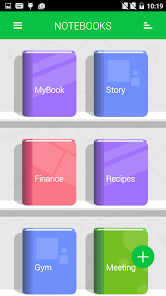
Create multiple notebooks for every subject and avoid messing up your notes.
Notebooks is the only application you will ever need for all your note making needs.
Designed with flexibility and ease of use in mind, taking notes is now at it simplest with our application. With multiple colors and custom title for each notebook cover, you will enjoy creating a notebook for every subject you want.
Notebooks is a must have application for students, business men and for anyone using their phones and tablets for taking notes.
*The permission GET_ACCOUNTS is to communicate with the Google Drive to backup the data. We do not store your account details in the app.
Features:
1. Create multiple notebooks.
2. Customizable cover, title, number of pages and page style for every notebook.
3. Password protected.
4. Set a title for every page.
5. Instant search within each notebook.
6. Attach image files.
7. Bookmark a page.
8. Create your own free hand drawing.
9. Easily find your entries.
10. Custom fonts for each notebooks.
11. Set theme for each notebook.
12. Convert the entire Notebook to PDF with attachments. (Currently supports English only)
13. Apply text styles such as Bold, Italics and Colored-Highlights
14. Backup/Restore.
(***Option available in the menu of the Notebooks screen. Some devices will not have the hardware menu
button on the device, in that case 'long press' the 'All Apps' button to get the menu on the app***)
15. Backup to Google Drive (Works on devices with OS higher than version 2.2)
FAQs: http://www.droidveda.com/faq/faq_notebooks.html
How to use?
1. Use '+' mark in the home screen to create new books.
2. Long tap on any book to edit/delete the book.
3. Use 'Password' option to set/reset the password.
4. On the Page tap on Page Header to set the Title for the page.
5. Make use of different editing options provided at the bottom of the page.
Note : Kindly download the verified app only from Google Play. Do not download the app from any other app sharing sites.
Рейтинг использования Notebooks
Рейтинг использования основан на алгоритме Similarweb, который подсчитывает текущие установки и активных пользователей за 28-дневный период.
Все категории в
Соединенные Штаты#6,359
Образ жизни в
Соединенные Штаты#447
Интересы пользователей & Топ-категории
Лучшие категории и приложения, используемые пользователями Notebooks
Топ категории
Близость
Top apps within the category
Другие приложения
13%





12%



9%




9%




Лучшие конкуренты & Альтернативные приложения
Приложения с высокой вероятностью будут использоваться одними и теми же пользователями, из одного и того же магазина.

Readwise Reader

Daily AI Writer: Email, Letter

MeisterTask - Task Management

Color Notes, Notebook, Notepad
Notebooks VS. апрель 24, 2026