

You’ve hit your search limit
Start your free trial to keep exploring full traffic and performance insights.
Get StartedCF.lumen аналитика приложений для 27 февраля

CF.lumen
- Chainfire
- Google Play Store
- Бесплатный
- Инструменты
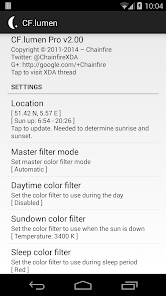
CF.lumen adapts the colors on your Android device based on the position of the sun, or your custom configuration.
NOTE: Android 5.0 is now required. Versions up to v3.16 that support 4.4 KitKat are still available from the XDA thread (see far below). Performance drop since v3.60? Turn on performance mode.
When using the default settings, your display will get a warmer tint (lower color temperature) when the sun is down, vastly reducing strain on the eyes. Blue light makes your brain want to stay awake, and a lower color temperatures reduces the amount of blue displayed; using this in the evening reduces your brain's effort to keep you awake at night.
During sleeping hours by default a red filter is used. Red strains your eyes the least, and retains your night vision.
Light sensor
The light sensor can be used to automagically adjust the color: switch to the sleep filter in full dark, or to the day filter (usually none) under bright lights.
Because light sensor quality varies wildly between devices, a calibration option is provided to experiment with.
Color filters
Several filters are provided. Those named after a color (red, green, blue, ...) do not limit the display to those colors, but convert the displayed image to grayscale first, then display that image in levels of the selected color. This preserves details that would otherwise be lost.
Grayscale, invert colors, temperature adjustment and custom R/G/B adjustment filters are also provided.
Colorblindness
The master color filter setting also has an option for colorblindness enhancement, with settings for protanopia/anomaly, deuteranopia/anomaly and tritanopia/anomaly. These options in theory enhance clarity and color detail.
No claims are made to the effectiveness of these filters. These filters were thought up by Google engineers, CF.lumen just includes them.
Pro version
Upgrading to CF.lumen Pro will support my developments, remove all nags, unlock the option to start at device boot (make sure you test your configuration first), and unlocks notification options. It also enables Tasker integration.
In Pro mode, the notification adds convenient buttons to quickly disable the current filter or switch to sleep mode, and you can switch the notification to when enabled mode, which shows the notification only when a color filter is active.
In non-Pro mode, the notification only asks you to upgrade to Pro. It may seem that notification is just there to annoy you, but it actually prevents Android from randomly killing the background service taking care of all the work. Getting rid of it without getting the service killed can be done by going to Settings -> Apps -> CF.lumen and unticking Show notifications.
Having Chainfire3D Pro (ancient) installed will enable Pro.
Performance
When no color filter is active, there should not be any noticeable performance impact. When a filter is active, impact depends on device and what you are doing. On some devices we have tested there was no performance impact at all, on others it was slightly noticeable. It also depends on the driver in use.
Future
Keep in mind that Android's rendering system changes over time. You should be aware that this app may simply stop working on future Android versions without the possibility of a fix.
Scary permissions
By far most permissions are used only for Google Maps to set your location, and Google Play to provide for In-App Purchases. I cannot make any claims as to what information the Google components do or do not send to Google servers, but no information is sent to me or anyone else (than Google).
More
Advanced user more information, discussion, and support, can be found in this app's thread on XDA-Developers: http://forum.xda-developers.com/showthread.php?p=51779367
Рейтинг использования CF.lumen
Рейтинг использования основан на алгоритме Similarweb, который подсчитывает текущие установки и активных пользователей за 28-дневный период.
Все категории в
Соединенные Штаты--
Инструменты в
Соединенные Штаты--
Лучшие конкуренты & Альтернативные приложения
Приложения с высокой вероятностью будут использоваться одними и теми же пользователями, из одного и того же магазина.

Game Booster GFX - No Lag

Asthma Diary

Dynamic Fitness Texas

Bolt (Dev)
 CF.lumen VS.
 февраль 27, 2026