

You’ve hit your search limit
Start your free trial to keep exploring full traffic and performance insights.
Get Started16 Nisaniçin Media Bar uygulama analizi
Media Bar
- IJP
- Google Play Store
- BOŞTA
- Müzik ve Ses
Media Bar (beta) doubles up your system's status bar as a media playback controller and progress indicator!
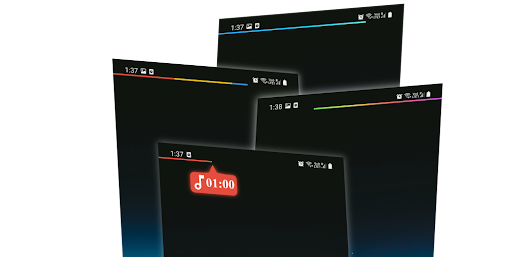
Whether you're listening to a podcast/music while browsing/gaming/multitasking or watching videos, you can now not only see the progress of the media through a thin bar at the top/bottom of your status bar but can also scrub through the media by swiping left/right on the status bar.
You can now quickly jump to a specific segment or forward/backward in steps of your song/podcast/video. Watching a long movie/podcast? Media Bar can be color coded to tell you the progress of the playback. Example:- Green Media Bar till 75% of the podcast, and it turns red till 100%.
Media Bar also has 3 invisible buttons that can be assigned to perform specific actions upon single tap, double tap and long press. The buttons touch regions can be customized as well.
Available actions/playback controls for Media Bar:
✓ Play/Pause
✓ Backward
✓ Forward
✓ Jump Backward by 'X' seconds
✓ Jump Forward by 'X' seconds
✓ Launch App
Media Bar features:
✓ The 3 invisible button regions can be adjusted.
✓ Media Bar can be configured to be as thin as 1 pixel.
✓ Media Bar can be located either top or bottom of the Status Bar.
✓ Media Bar's background can be opaque or transparent.
✓ Media Bar's origin can be configured to be left/center/right.
✓ Media Bar can auto hide on full screen Apps.
✓ Media Bar can be color coded with various color configurations available.
Media Bar color coded:
✓ Solid - Media Bar will always display in a single(any) color of your choice.
✓ Dynamic - Media Bar can change colors according to either the App which is playing the media or based on the album art of the media.
✓ Segments - Whole of Media Bar will change to a specific color based on progress of media.
✓ Merged Segment - Media Bar will display all the segments of color you've assigned while making the progress.
✓ Gradient Segment - Whole of Media Bar will gracefully change its color as it progresses from one segment of the media playing to another.
✓ Gradient - Media Bar will display a gradient of color as it progresses through the media.
Starting up Instructions:
* Click the top right toggle to go to Accessibility Settings, find and turn on Media Bar (you may have to look for it inside 'Downloaded Services')
* Enabling the Accessibility Service should open 'Notification Access' settings, allow Media Bar access. In case 'Notification Access' settings doesn't open automatically on your phone, please find it in System settings.
* Both the Accessibility Service and Notification Access needs to be always on for Media Bar to work.
Accessibility Service Requirement
Why does Media Bar need Accessibility Service?
Media Bar requires Accessibility Service to empower the Status Bar to control media playback without disrupting your current screen or activity. This functionality allows seamless media control directly from your Status Bar.
Does Media Bar access your data?
No. Media Bar does not gather, access, collect, or store any personal or sensitive user data. The Accessibility Service is used solely to enable media control functionality locally on your device.
Who can benefit from Media Bar?
This service is especially useful for individuals who prefer to control media playback without losing focus on their current screen or application.
Consent Required:
By enabling this service, you consent to its use exclusively for the purpose stated above. You can disable the Accessibility Service at any time through your device’s settings.
Media Bar kullanım sırası
Kullanım sıralaması, Similarweb'in 28 günlük bir süre boyunca mevcut yüklemeleri ve aktif kullanıcıları hesaplayan algoritmasına dayanmaktadır.
Tüm kategoriler içinde
Amerika Birleşik Devletleri--
Müzik ve Ses içinde
Amerika Birleşik Devletleri--
Kullanıcıların İlgi Alanları & En İyi Kategoriler
0}Media Bar kullanıcıları tarafından kullanılan başlıca kategoriler ve uygulamalar
En Popüler Kategoriler
Yakın ilgi alanı
Kategorideki En Popüler Uygulamalar
42%
37%


9%

8%




En İyi Rakipler & Alternatif Uygulamalar
Aynı mağazadan, aynı kullanıcılar tarafından kullanılma olasılığı yüksek olan uygulamalar.

Game Booster GFX - No Lag

Chaos Audio

Stellio - Music and mp3 Player

Asthma Diary
 Media Bar VS.
 Nisan 16, 2026